



A customer searches “plumber near me,” sees three businesses on the map, and calls one. If you aren’t one of them, you never know they looked.
Local SEO for small businesses is how you help Google show your business in local results, including the map pack. It means a verified, complete Google Business Profile, consistent business details, real reviews, and a useful local website.
How we built this guide: it draws on Google’s Business Profile and Search Central documentation, BrightLocal’s Local Consumer Review Survey 2026 (1,002 U.S. adults), web.dev, and named pricing surveys. Google doesn’t publish ranking weights, and we don’t promise rankings. Sources are listed at the end, with the date we checked them.
Why local SEO for small businesses matters
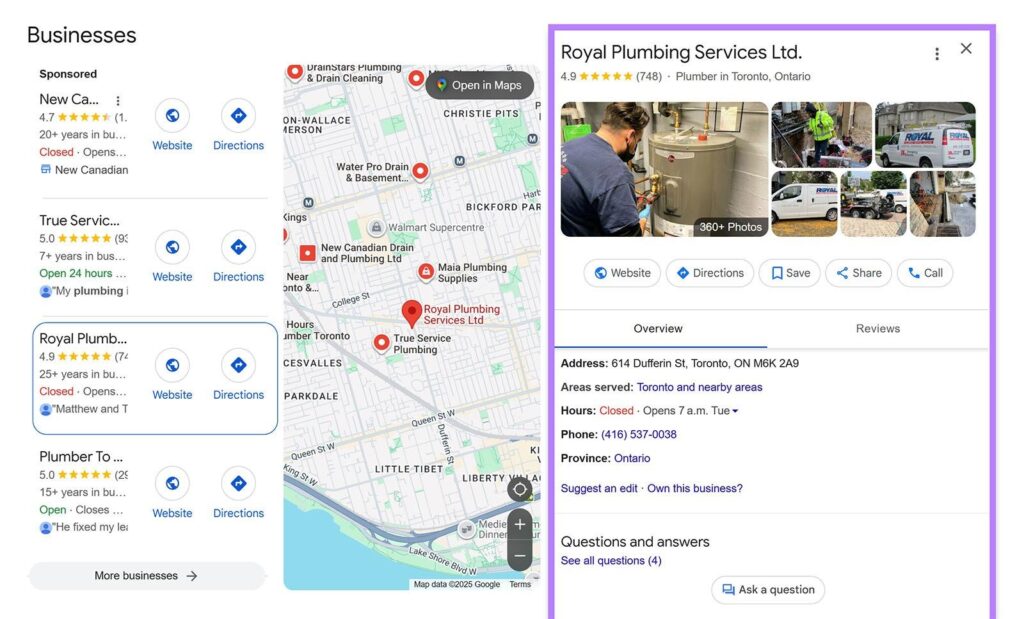
Local SEO matters because customers choose from a short list on the map before they ever visit a website. Google says local results are mainly based on relevance, distance, and prominence, so a complete, verified profile and strong reviews decide whether you appear on that list.
Most local searches show the Local Pack, a map with three listings at the top. Searchers don’t even need to type “near me.” Google’s Business Profile Help says that when a search doesn’t include a location, Google estimates distance from what it knows about the searcher’s location.
BrightLocal’s 2026 survey shows how people research businesses now:
- The average consumer uses six review sites when choosing a business.
- Google is still the top site for reading reviews, but its share dipped from 83% to 71%, while AI tools such as ChatGPT rose from 6% to 45% for local recommendations, and Apple Maps use nearly doubled from 14% to 27%.
- After reading positive reviews, 54% visit the business’s website.
Many small businesses still lack the basics. BrightLocal’s earlier SMB research, cited in its 2026 report, found only 35% of small businesses have a Google Business Profile and about 40% have a dedicated website. Those gaps are your opening.
Local SEO for small businesses at a glance
| Step | Core action | Main payoff |
|---|---|---|
| 1. Business Profile | Verify it and complete every field | Eligibility and relevance for the Local Pack |
| 2. Website | Service and location pages, schema, fast mobile pages | Clear signals for search engines and customers |
| 3. Citations | Keep NAP identical across directories | Trust in your business details |
| 4. Reviews | Ask everyone, reply to all, follow the rules | Prominence and conversions |
| 5. Links and PR | Earn local sponsorships and mentions | Prominence across the web |
Local SEO for Small Businesses Step by Step
Step 1: Claim and optimize your Google Business Profile
In local SEO for small businesses, your Business Profile is the single most important local asset. Follow these steps in order:
- Claim and verify it. Google says verification tells it you’re authorized to represent the business, and verified profiles are more likely to show up. See our guide to google business verification.
- Use your real business name. Google’s guidelines say to match your real-world name, with no keywords, taglines, or phone numbers. Names stuffed with extras can get a profile suspended.
- Choose the most specific primary category, plus the fewest additional categories that describe your core business.
- Add accurate hours, a local phone number, and your real address. Service-area businesses should hide their address and set a service area.
- List your services or products and add attributes such as parking or accessibility, and write a description with no links or promotions.
- Upload real photos of your exterior, interior, work, and team.
NAP means Name, Address, and Phone. Keep it identical on your profile, website, and every listing. For the full list of local ranking factors, read how to rank higher on Google Maps. For the optimization side, see our Google Business Profile SEO guide.
Google’s Profile Strength tool flags missing info on verified profiles. Duplicate or outdated listings also hurt, so if you have one, learn how to remove business from google business before you create anything new.
Step 2: Local keywords, service pages, and location pages
Local SEO for small businesses also depends on your website, which tells Google what you do and where. Start with how customers search: a service plus a place, such as “emergency plumber [city]” or “dentist near [neighborhood].” You can find ideas free in Google’s autocomplete, your Search Console queries, and the search terms in your Business Profile Performance report.
| Search customers use | Page that answers it | Note |
|---|---|---|
| emergency plumber [city] | Your emergency plumbing service page | Mention the areas you really serve |
| plumber [neighborhood] | A location page only if you have a real presence there | Otherwise cover it on one service-area page |
| water heater repair near me | Your water heater service page | Distance still decides which businesses show |
One page per service, and per real location
Give each main service its own page, and each real location its own page. Don’t mass-produce near-identical city pages. Google’s spam policies call pages targeted at regions or cities that funnel users to one page doorway abuse. A page for a city you actually serve should carry real local detail, like the neighborhoods, photos, and reviews.
On-page checklist
- ☐ Title tag and H1 with the service and city, written for people.
- ☐ NAP matching your Business Profile, with a click-to-call phone number.
- ☐ Service details: what you do, prices or ranges when possible, and how booking works.
- ☐ Proof: real reviews, photos, and credentials.
- ☐ Map and directions embedded on location pages.
- ☐ Internal links from your menu and related pages to each service and location page.
- ☐ Mobile speed: aim for Google’s Core Web Vitals “good” thresholds: LCP of 2.5 seconds or less, INP of 200 milliseconds or less, and CLS of 0.1 or less, per web.dev.
LocalBusiness schema
Add LocalBusiness schema, a snippet of structured data that spells out your details for search engines. Google’s documentation lists name and address among the required properties. Keep it matching your visible page. A minimal example with placeholders:
<script type="application/ld+json">
{
  "@context": "https://schema.org",
  "@type": "LocalBusiness",
  "name": "[Business name]",
  "address": {
    "@type": "PostalAddress",
    "streetAddress": "[Street]",
    "addressLocality": "[City]",
    "addressRegion": "[State]",
    "postalCode": "[ZIP]"
  },
  "telephone": "[Phone]",
  "url": "https://example.com/location/"
}
</script>
Step 3: Citations and NAP consistency
Local SEO for small businesses relies on consistent listings. A citation is a mention of your business name, address, and phone number on another website, such as a directory or association. Google says prominence draws on info from across the web, and consistent details help it trust that yours are right. BrightLocal also advises building local citations on relevant niche and local sites, since AI tools pull from many sources.
| Where to check | Why |
|---|---|
| Apple Maps | BrightLocal found its use nearly doubled in a year, from 14% to 27% |
| Bing Places | Another major map and search source |
| Facebook and Yelp | Facebook is the second most-used site for reading and writing reviews, and Yelp is third for writing |
| Industry directories | BrightLocal saw Tripadvisor, BBB, and Healthgrades usage rise in 2026 |
| Local associations and chambers | Relevant local mentions and links |
- Write your master NAP, down to “Street” versus “St.”
- Search your business name and phone number to find wrong or duplicate listings.
- Fix or merge those listings, and claim the ones you don’t control.
- Add listings on relevant sites, by hand or with a tool. One vendor, BrightLocal, advertises citation building from $2 per citation on its site (checked October 2026).
- Re-check every time you move or change your number.

Step 4: A review strategy that follows the rules
Reviews are a core part of local SEO for small businesses. Google says more reviews and positive ratings can help your local ranking. Shoppers agree: BrightLocal’s 2026 survey found 47% won’t use a business with fewer than 20 reviews, 74% only care about reviews from the last three months, and 68% only use businesses rated four stars or higher.
- Ask every customer with the same message and a direct link or QR code. See our how to ask customers for reviews scripts.
- Reply to every review. 89% of consumers expect a reply, and 19% expect one the same day.
- Stay inside the rules. Don’t buy reviews, offer gifts, or screen who you ask. Those break Google’s policy and the FTC’s 2024 rule.
For the full playbook, read our pillar guide to google reviews for business.
Step 5: Local links, sponsorships, and PR
Google says prominence includes how many websites link to your business. Earn links from sources that already know you:
- Sponsorships: a youth team, school event, or charity run that lists sponsors with links.
- Associations and chambers: membership pages that link to member websites.
- Local press: a story pitch about something newsworthy, such as an opening, an award, or a community project.
- Partners and suppliers: “where to buy” or “trusted partners” pages.
- Your own news: events, hires, or community work that other sites can cite.
Don’t buy or trade links purely to manipulate rankings. Google’s spam policies treat that as link spam.
How to track local SEO for small businesses
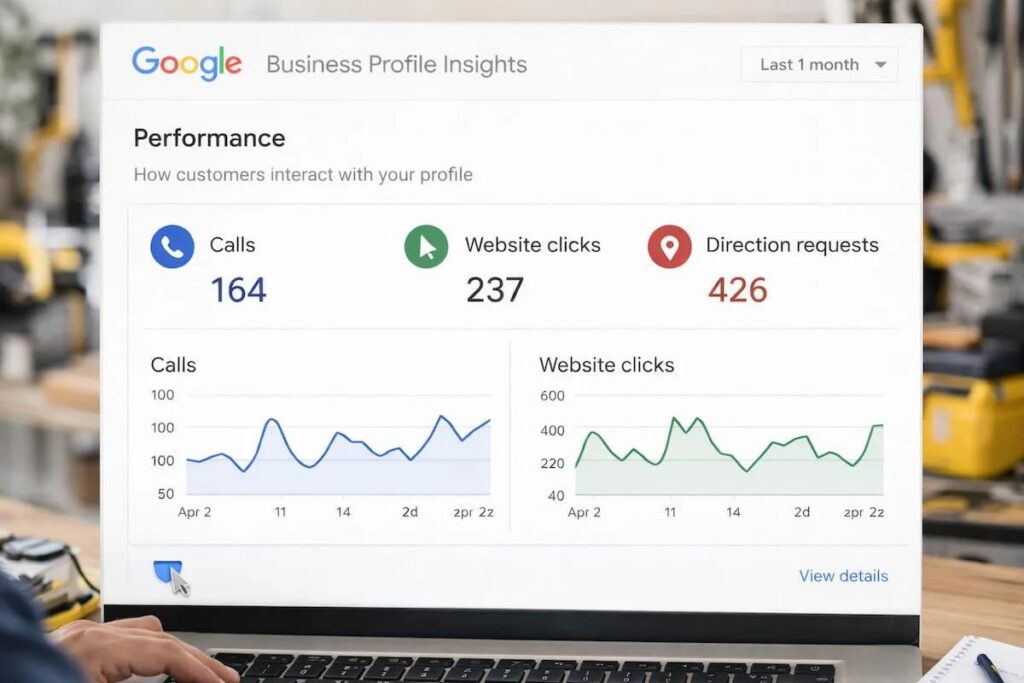
Track four things monthly: calls and directions from your Business Profile Performance report, your map ranking across a local grid, and your website queries and pages in Google Search Console. Rankings only matter if they bring calls, directions, and bookings.
| Metric | Where to find it | What it tells you |
|---|---|---|
| Calls, directions, website clicks, bookings | Business Profile Performance | Whether visibility turns into action |
| Profile searches | Business Profile Performance (updated monthly) | The terms people used to find you |
| Map ranking | A local grid tool, such as BrightLocal’s Local Search Grid | How you rank from many points around you |
| Queries, pages, clicks | Google Search Console, Performance report | Which searches and pages bring website traffic |
| Core Web Vitals | Search Console, Core Web Vitals report | Real-user page experience on mobile and desktop |
| Call outcomes | Your phone log or a call tracking number on your site | Answered calls and booked jobs |
Rankings change with the searcher’s location, so one rank number can mislead. A grid shows where you win and where you don’t. Also check how AI tools describe your business, since BrightLocal found 45% of consumers used them for local recommendations.
Common mistakes and Google Business Profile suspension
- Keywords in your business name. It breaks Google’s guidelines.
- A mailbox or virtual office address. Those locations aren’t eligible.
- Duplicate profiles or listings for one location.
- Copy-and-paste city pages that risk doorway abuse.
- Fake reviews, gifts for reviews, or screening customers.
- Inconsistent NAP across your site and directories.
- Ignoring tracking. Without data, you can’t tell what works.
If Google suspends or disables your profile, fix the guideline issue first, then use Google’s appeal tool. It may ask for evidence such as business registration, a license, tax certificates, or utility bills. Once the evidence form opens, you have 60 minutes to submit it. If Google denies the request, you may be able to ask for an additional review.
Cost, and whether to DIY or hire an agency
Surveys of SEO pricing disagree by more than 3 times, so treat any single number carefully. Web Tonic’s August 6, 2026 pricing roundup summarizes named surveys: Ahrefs’ poll of 439 professionals found an average agency retainer of $3,209 a month, with $501 to $2,000 the most common range. SE Ranking’s agency survey found 64% of providers charge under $1,000 a month. Local-focused work averages about $1,557 a month in that roundup.
| Option | What it costs | Best when |
|---|---|---|
| DIY | Mostly your time. Business Profile and Search Console are free, with optional tools such as rank trackers or citation builders. | You have a few hours a week and one location |
| Freelancer or small agency | A monthly retainer or a one-time project, which varies widely | You want setup and ongoing help |
| Full-service agency | Higher retainers, per the surveys above | You have several locations or a competitive market |
If you hire, ask who owns your Business Profile and ad accounts, how results are reported (calls and bookings, not just rankings), what the contract length is, and what’s included. We offer our own Google Maps SEO service, so weigh our view with that in mind and compare options.
Your first 30 days of local SEO for small businesses
- Week 1: claim and verify your Business Profile, then fix your name, category, hours, and address.
- Week 2: audit citations and correct NAP on your top listings, and complete your services and photos.
- Week 3: improve your top service page and add LocalBusiness schema, then start steady review requests.
- Week 4: set up tracking in your Performance report and Search Console, and pitch one local sponsorship or story.
Local SEO for small businesses compounds, so repeat the review, citation, and link work every month. Judge progress by calls, directions, and bookings.
Local SEO for small businesses: FAQ
Is local SEO worth it for a small business?
It is when customers search for your service in your area and you can serve them. Google says local results are based on relevance, distance, and prominence, and none of those factors can be bought, so the work is mostly time spent on your profile, reviews, and website.
How long does local SEO take to work?
Google doesn’t publish timelines, and no one can guarantee a ranking. Fixes such as verification and correct categories are in your hands now, while reviews, links, and citations build gradually.
How much does local SEO cost?
It ranges widely. Named 2026 surveys summarized by Web Tonic put average agency retainers above $3,000 a month, but most providers in one poll charge under $1,000, and local-focused work averages about $1,557 a month. Doing it yourself costs mainly time plus optional tools.
Can I do local SEO myself?
Yes. The core tools, Google Business Profile and Google Search Console, are free. Hire help when you lack time, run multiple locations, or work in a regulated or very competitive field.
Do I need a website for local SEO?
Not to create a Business Profile, since Google accepts a phone number or a website. But BrightLocal found 54% of consumers visit a business’s website after reading positive reviews, so a good site captures that interest.
Is Google My Business the same as Google Business Profile?
Yes. Google renamed Google My Business to Google Business Profile. You now manage your profile in Google Search and Maps.
How many reviews do I need?
There’s no magic number. BrightLocal’s 2026 survey found 47% of consumers won’t use a business with fewer than 20 reviews, so treat 20 as a floor and keep earning new ones.
Want local SEO handled for you?
Our team can set up your profile, reviews, and citations, and track results through local SEO for your business. We make no ranking promises, only a clear plan and reporting.
Sources (checked October 19, 2026): Google: local ranking; Google: representation guidelines; Google: Performance; Google: suspended profiles; Google Search Central: spam policies; Google Search Central: LocalBusiness; web.dev: Web Vitals; BrightLocal Local Consumer Review Survey 2026; Web Tonic: SEO pricing guide (Aug 6, 2026). Google doesn’t publish ranking weights. Prices vary by market and scope.