



Your competitor two blocks away has a packed Friday night. You don’t. The difference? 72% of customers use Facebook to make restaurant decisions based on photos and reviews – and your competitor’s Facebook page is working hard while yours sits dormant.
Facebook marketing for restaurants isn’t complicated, but it does require a clear plan. The platform reaches over 3 billion monthly users, meaning your ideal customers are already scrolling. What you need is a system to put your food in front of them, show why your restaurant matters, and give them a reason to visit. That’s what this guide covers – step-by-step strategies to build your Facebook presence, run ads that convert, and measure what actually works.
By the end, you’ll have a working Facebook strategy you can implement this week.
What Facebook Marketing for Restaurants Actually Means
Facebook marketing for restaurants is the combination of an optimized business page, regular content, paid ads, and direct customer messaging that a restaurant uses to reach people in its delivery or dine-in radius. It’s not just “posting sometimes.” Restaurants that treat it as a system – page, content calendar, small ad budget, and review management – consistently outperform ones that post at random.
The reason it still works even with Facebook’s younger audience shrinking is simple: people use it to decide, not just to scroll. They check your hours, look at your menu photos, and read what other customers said before they book a table or place a catering order.
8 Facebook marketing strategies for restaurants
1. Set Up Your Facebook Business Page
Before you run ads or post anything, you need a foundation. A poorly set-up Facebook Business Page signals to potential customers that you’re not serious about your business.
Here’s exactly how to build one that works:
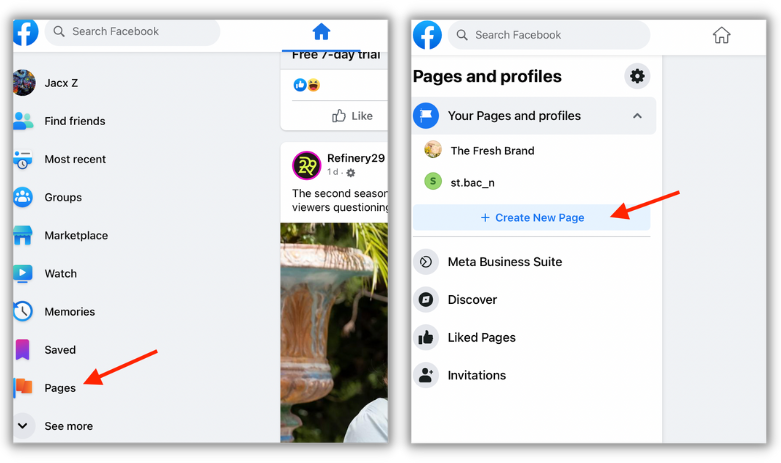
Step 1: Create the page
- Log into your personal Facebook account
- Click Create Page and select “Restaurant” as your business category
- Add your restaurant name, address, phone number, and website
Step 2: Optimize your profile
- Use a high-quality photo of your best dish or your restaurant’s exterior for the profile picture
- Add a cover photo that showcases either your food, your ambiance, or a current promotion
- Fill out your About section with a clear description of your restaurant, mentioning where it’s located
- Add your menu through Facebook’s built-in menu feature (available when your page is categorized correctly)
- Include your hours, website link, and a clear call-to-action button (“Order Now,” “Make a Reservation,” “Call Now”)
Why this matters: A well-optimized Facebook page with clear hours, menus, photos, and ordering links makes it easier for customers to discover and order from your restaurant. When someone finds you through a friend’s recommendation or a local search, a complete profile converts them into a customer instead of a visitor who leaves.
Incomplete or outdated pages cost you sales. Don’t skip this step.
2. Build a Content Strategy That Keeps Customers Engaged
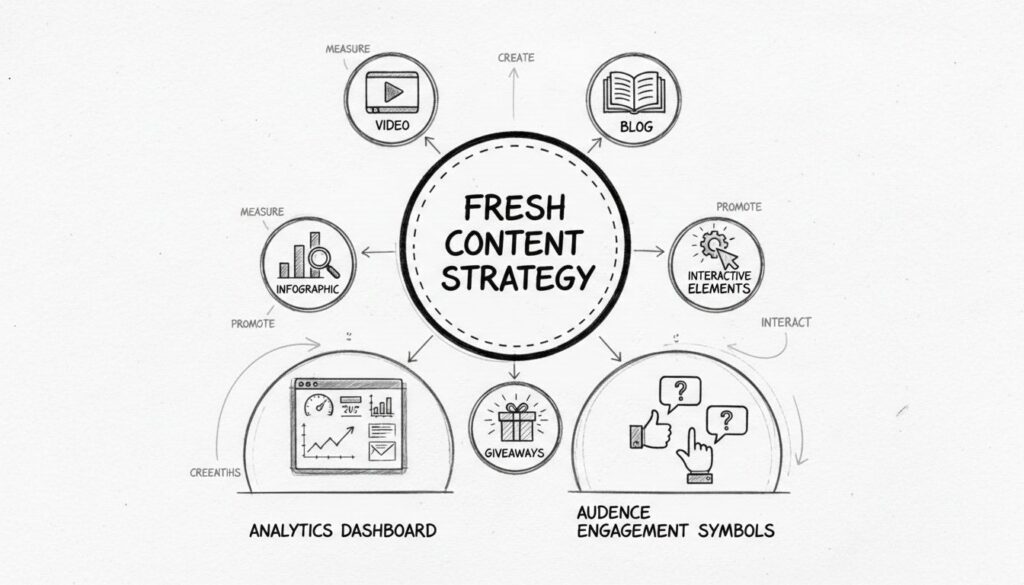
Content is the fuel of Facebook marketing for restaurants. But “content” doesn’t mean posting random photos every day – it means a planned strategy that makes followers hungry and gives them reasons to visit.
What content performs best:
The best performing Facebook content for restaurants is short, visual and authentic – think short videos of food being prepared, behind-the-scenes moments, new menu items, and user-generated content like happy customer photos.
Posts that invite engagement – like polls or questions – can also help boost your organic reach. Example: “Steak or seafood?” or “What’s your go-to order this season?”
Your posting rhythm:
You don’t need to post every day. Aim for 2–3 posts per week with strong visuals and a clear purpose, such as driving sales or engagement. One day each week, batch-create and schedule posts using Meta’s content calendar.
Content ideas to rotate:
- New menu items (1 post/week)
- Behind-the-scenes kitchen or team moments (1 post/week)
- Customer testimonials or tagged customer photos (1–2/week)
- Happy hour, specials, or limited-time promotions (as needed)
- Polls or questions inviting comments (1–2/week)
The goal: keep your restaurant top-of-mind and give people a visual reason to visit.
3. Master Facebook Ads
Organic reach on Facebook is limited – that’s why ads are essential for reaching new customers. The good news: you don’t need a huge budget to see results.
The Facebook ads basics:
Facebook ads let you target by location, age, interests, and behaviors. Facebook marketing for restaurants is a great tool to reach target customers because each ad is highly customizable.
Types of ads that work for restaurants:
- Single-image ads – one photo of your best dish or restaurant setting with a simple message (“Fresh pasta, nightly. Book a table”)
- Carousel ads – carousel ads showcase multiple food items in one ad, ideal for showcasing your menu variety
- Video ads – use video ads to show a dish being plated, share your team in action, or give a quick kitchen tour – anything that helps diners feel like they’re already there
Setting up your first Facebook ad campaign:
- Define your goal: Are you driving foot traffic, online reservations, or catering inquiries?
- Set your budget: Start with $10–20/day to test what works
- Target by location (within 5–15 miles of your restaurant, depending on your market)
- Target by audience: age, income level, interests (food, dining, entertainment)
- Test different ad creatives (images/videos) and copy to see what drives clicks
- Track clicks and measure which ads drive actual orders or reservations
Pro tip: You don’t need a massive budget to make restaurant Facebook ads work; you just need the right combo of targeting, timing, and content.
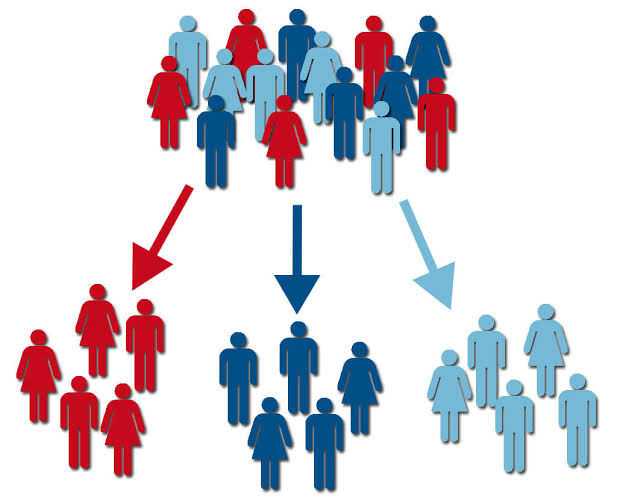
4. Use Audience Segmentation to Reach the Right People
Broad targeting wastes money. Smart targeting converts.
Segment your audience by:
- Location: Local customers vs. tourists
- Behavior: People who’ve visited before vs. new prospects
- Interest: Foodies, event planners (for catering), families with kids
- Timing: Weekend diners, lunch crowd, late-night seekers
For example, if you offer corporate catering, running ads targeting business owners and event planners in your city will outperform targeting Gen Z food bloggers.
Retargeting: Once someone visits your website or engages with your Facebook page, show them ads reminding them to book or order. This is often your cheapest, highest-converting traffic.
5. Leverage Two-Way Communication to Build Loyalty

Facebook isn’t just for broadcasting – it’s for connecting.
Facebook lets you message customers directly, respond to reviews publicly, and answer questions in real-time. This two-way communication builds trust and shows potential customers that you care about their experience.
How to use this:
- Respond to reviews (both good and bad) within 24 hours
- Answer comments on posts and engage in conversation
- Use Messenger to handle reservation or catering inquiries
- Ask questions in posts to spark conversation (“What’s your favorite starter?”)
Restaurants that respond to customer messages and reviews see higher customer loyalty and better reviews. Make this a daily 10-minute habit.
6. Make Online Ordering Frictionless
Facebook ads and online ordering tools amplify visibility, drive traffic, and convert casual followers into paying customers.
Add an “Order Now” button to your Facebook page that links directly to your online ordering system (or phone number). Every post about food should have a clear next step: “See the full menu and order” or “Call to reserve.”
7. Track What Works (Don’t Guess)
Many restaurants run Facebook ads blindly and wonder why they’re not working. You need metrics.
Track these:
- Click-through rate (CTR): Are people clicking your ads?
- Cost per click: Are you paying too much?
- Conversions: How many people actually ordered or made a reservation?
- Return on ad spend (ROAS): For every $1 spent, how much did you earn?
Facebook’s built-in analytics show you this. If an ad isn’t performing after $50–100 spent, pause it and try a different image, audience, or message.
8. Build a Community, Not Just a Following
With the right setup and consistency, you can use Facebook to promote your restaurant on social media and make ordering easier for customers.
This means:
- Responding to every comment and message
- Featuring customer photos and testimonials
- Creating events (happy hour, new menu launches, special dinners)
- Building familiarity so followers feel like regulars
A restaurant with 500 engaged followers will outperform one with 5,000 silent followers.
FAQ
How often should I post on Facebook?
Aim for 2–3 posts per week with strong visuals. More won’t hurt if the content is good, but consistency matters more than frequency.
What’s a realistic budget for Facebook ads?
Start with $10–20 per day ($70–140/week) to test what works. Once you find winning ads, increase to $30–50/day. Restaurant owners often see a return within 30–60 days.
How long before I see results from Facebook marketing?
Organic posts take 2–4 weeks to build momentum. Ads can drive results in days, but you need to test and refine first.
Should I hire someone to manage my Facebook?
If you’re posting 2–3 times weekly and responding daily, you can handle it yourself (1–2 hours/week). If you’re running ads and need strategic management, consider hiring a social media expert.
Can Facebook marketing work for fine dining or upscale restaurants?
Absolutely. Fine dining restaurants use Facebook to showcase their chef’s artistry, promote special events, and reach customers looking to book private dining.
Is Facebook better than Instagram for restaurants?
Both work. 59% of restaurants prioritize Facebook as their main platform, partly because of its local targeting and older demographic. Use both – they’re complementary.
Conclusion
Facebook marketing for restaurants isn’t magic – it’s a system. Start with a complete, optimized page. Post consistent, visual content. Run targeted ads to local customers. Engage in real-time. Track results. Then repeat what works.
Most restaurant owners skip the basics (page setup, consistent posting) and jump straight to ads. Do the fundamentals first. In 4–6 weeks, you’ll have a working system that brings new customers through your door.
Ready to scale this beyond Facebook? See how automated marketing tools help restaurants manage multiple channels at once – social media, email, and customer reviews in one dashboard.