



Most advice on how to make Facebook ads for free is really about posting on your Page, and that isn’t advertising. Here’s the honest version: creating an ad account, a Page, and a campaign in Meta Ads Manager costs nothing. Showing the ad to people does cost money, but you can start with a few dollars a day.
Make Facebook Ads for Free in 8 Steps
- Open Meta Ads Manager.
- Choose one campaign goal.
- Set a small daily budget and a short schedule.
- Define a local audience.
- Leave placements automatic.
- Build your ad creative.
- Set up tracking.
- Review, publish, and wait before judging.
What to Prepare Before You Start
- A Facebook Page for your business. Ads run through your Page.
- A Meta business account (called a Business Portfolio) and an ad account. Both are free to create.
- A payment method in your ad account.
- One clear offer, such as a free estimate or a new-client special, and one place to send people: a booking page, your website, or an instant form.
- One image or short video. Free design tools like Adobe Express or Canva work fine. Use a real photo of your work or team when you can.
- A privacy policy link if you plan to use lead ads. The form requires one.
What it really costs
Costs vary a lot by industry, season, and method. Treat these sourced figures as ranges, not promises.
| Figure | Amount | Source and date |
|---|---|---|
| Average CPC (cost per click), traffic campaigns, US advertisers | $0.70 | LocaliQ benchmarks (updated Oct 2025), as reported by Superscale (page updated July 23, 2026) |
| Average CPC, lead campaigns | $1.92 | Same source |
| Average cost per lead | $27.66 | Same source |
| US median CPC, all industries | $1.12 | Superads, June 2026 |
| Daily budget overspend on some days | Up to 25% | Meta for Developers budget documentation (checked Oct 2026) |
| Minimum daily ad set budget | About $1 for many setups | AdAdvisor, 2026 (third party). Meta’s minimum varies, so check Ads Manager. |
Here’s what that means on a tiny budget. At $5 a day for seven days, you’d spend about $35. At $0.70 per click, that’s roughly 50 clicks. At $27.66 per lead, it’s about one lead. A small budget buys a test, not a pipeline.
Create and Launch Your First Facebook Ad
Meta changes Ads Manager often, so button names may differ slightly from what you see.
Step 1: Open Meta Ads Manager
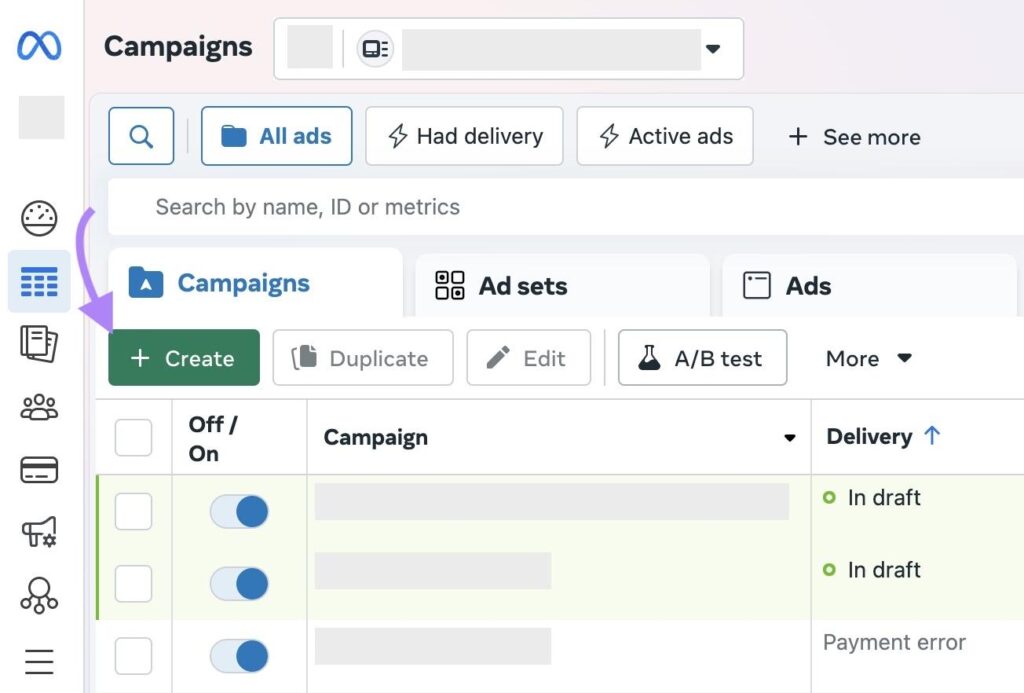
Go to Ads Manager, select your business portfolio and ad account, and click Create. This is where all campaigns live.
Step 2: Choose one campaign goal
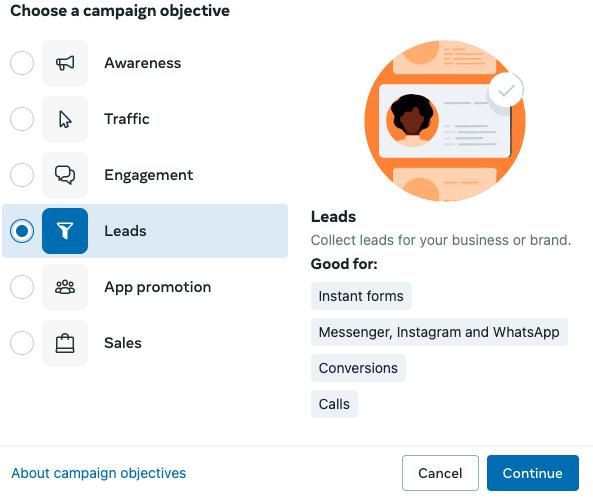
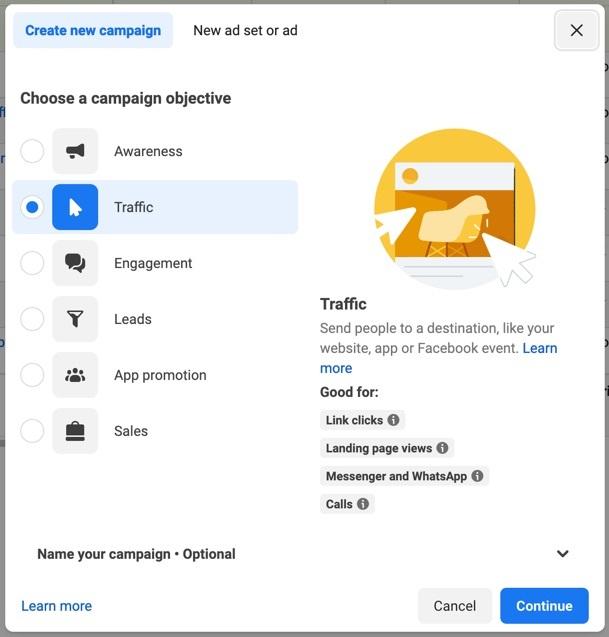
Pick the single result you want. For local businesses, Leads (instant forms or messages) or Traffic to a booking page are the simplest. Meta may also offer Advantage+ campaign setups for your goal. They automate audience and placements, which helps beginners, though you give up some control.
Step 3: Set a small budget and a short schedule
Choose a daily budget you can afford to lose, then run the ad for five to seven days. Don’t split a small budget across many ad sets. Use one campaign, one ad set, and two ads.
Step 4: Define a local audience
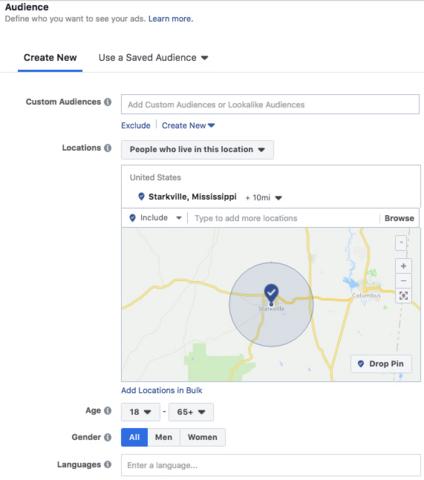
Target a radius around your location, such as your city or a set number of miles. Keep age and interests broad and let Meta find people. Custom audiences (your customer list or website visitors) can help later, and lookalike audiences need a decent-size source list, so skip them at first.
Step 5: Leave placements automatic
Automatic placements let your ad appear on Facebook, Instagram, and Reels, wherever it’s cheapest to get your result. Restrict placements only after you have data.
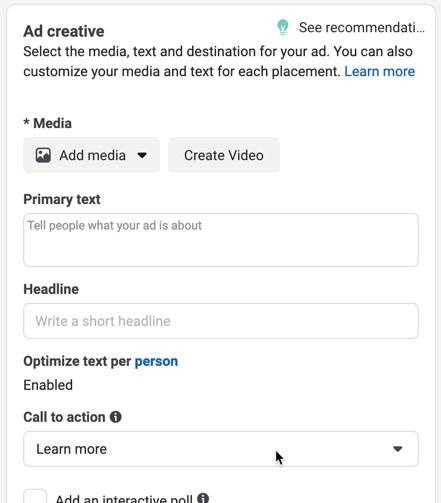
Step 6: Build your ad creative
Upload one image or a short video. For Reels ads and Stories, use vertical 9:16 video, and for the feed, use square or 4:5. Write a short headline, a primary text with your offer, and a clear button such as “Book now.” Test two creatives that differ in one thing, like the image or the headline.
Step 7: Set up tracking
If you send people to a website, install the free Meta Pixel in Events Manager, and consider the Conversions API for more reliable data. Instant lead forms don’t need a pixel. If you’re a health practice, don’t send patient information through either tool (see the local tips below).
Step 8: Review, publish, and wait
Click Publish. Meta reviews every ad before it runs. Once it’s live, resist editing for the first few days, because changes can restart delivery. Judge it on CPM (cost per 1,000 views), CPC, and cost per lead, not on likes.
Common Facebook Ad Errors and How to Fix Them
| Problem | Likely cause | Fix |
|---|---|---|
| Ad rejected | Policy issue: health claims, before/after images, or text implying you know something personal about the viewer. | Read the reason in Account Quality, edit the ad, and request a review. |
| No impressions | Budget too low, audience too narrow, or a billing problem. | Widen the radius, raise the budget slightly, and check your payment method. |
| Spend, but no leads | Weak offer, long form, or slow follow-up. | Shorten the form, sharpen the offer, and reply to leads fast. |
| High CPM or CPC | Tired creative, narrow audience, or a busy season. Superads data shows US costs spike in Q4. | Test a fresh creative, broaden the audience, and avoid launching in peak weeks. |
| Pixel not firing | Code not installed, wrong event, or a consent banner blocking it. | Check it with the Meta Pixel Helper browser extension. |
| Account restricted | Repeated policy violations or unverified business details. | Appeal through Account Quality. Don’t open duplicate ad accounts. |
Tips for US Local Businesses
- Use a tight radius. A neighborhood or city beats a whole state for a local service.
- Make the next step easy. Instant forms or a one-tap booking link usually beat a long website visit on a phone.
- Show real people. A 15-second vertical video of your actual team often fits Reels better than a stock photo.
- Respect the targeting limits. Meta removed detailed targeting options tied to sensitive topics such as health in 2022 and again in 2024, so don’t build ads around a viewer’s condition.
- Watch special ad categories. Credit, employment, and housing ads must follow extra restrictions in Ads Manager.
Your industry matters too. Practices that handle patient data should read our guides to facebook ads for dentists and facebook ads for doctors, which cover health-ad and privacy rules. Online stores that need catalog and purchase tracking can start with Facebook Ads for ecommerce.
FAQ: Making Facebook Ads for Free
Can you really make Facebook ads for free?
You can create them for free, but you pay for delivery. Posting on your Page or in groups is free, though it isn’t paid advertising.
What is the minimum budget for Facebook ads?
Many setups allow about $1 a day per ad set (AdAdvisor, 2026), but the minimum varies. A budget that small gives Meta very little data, so expect slow, uneven results.
Is boosting a post the same as running an ad?
A boost is a simplified ad. Ads Manager gives you more control over goals, audiences, and placements.
Do I need a website to run Facebook ads?
No. You can use instant lead forms or messages instead. A website helps if you want to track bookings with the Meta Pixel.
How much do Facebook ads cost?
LocaliQ’s data (updated Oct 2025) puts the US average at $0.70 per click for traffic campaigns and $27.66 per lead. Your cost will depend on your industry and offer.
How long until I see results?
Give a new ad at least several days of delivery before judging it. Judge cost per lead or booking, not likes.
Start Small, Then Learn From the Data
Run one campaign with a budget you can afford to lose, test two creatives, and keep what works. When you’re ready to scale, read our full guide to facebook advertising for small businesses.
Sources: Superscale, Facebook ads cost (page updated July 23, 2026; LocaliQ data Oct 2025) · Superads, US CPC benchmarks (June 2026) · Meta for Developers, budgets · AdAdvisor, budget guide · Search Engine Journal, Meta targeting changes (2022). Figures change often, so confirm current numbers and policies before acting.