



A customer leaves three stars and a two-line complaint on Friday night. By Monday, the next person who searches your business has read it and found nothing from you. How to respond to Google reviews comes down to a short routine: thank them, mention a detail, own the problem, move the conversation offline, and sign your name. This guide covers the steps on desktop and mobile, 20 templates, and when to flag a review instead of replying.
Why Responding to Google Reviews Matters
Replying shows customers that a real person is listening. Google says replies show you value feedback, the reviewer gets a notification, and they can update their review afterward. Reviews and ratings also feed local ranking, so steady, well-handled feedback supports your visibility in the Local Pack.
Customers do read. BrightLocal’s 2026 survey of 1,002 U.S. adults found 97% read online reviews of local businesses, so your reply is part of what they see. For the bigger picture, read our guide to google reviews for business.
How to Reply to a Review on Google: Step by Step
To reply to a Google review, verify your business first. Google says you can’t answer reviews until your Business Profile is verified. Then, following Google’s help page:
On a computer
1. Sign in with the Google account that manages your Business Profile.
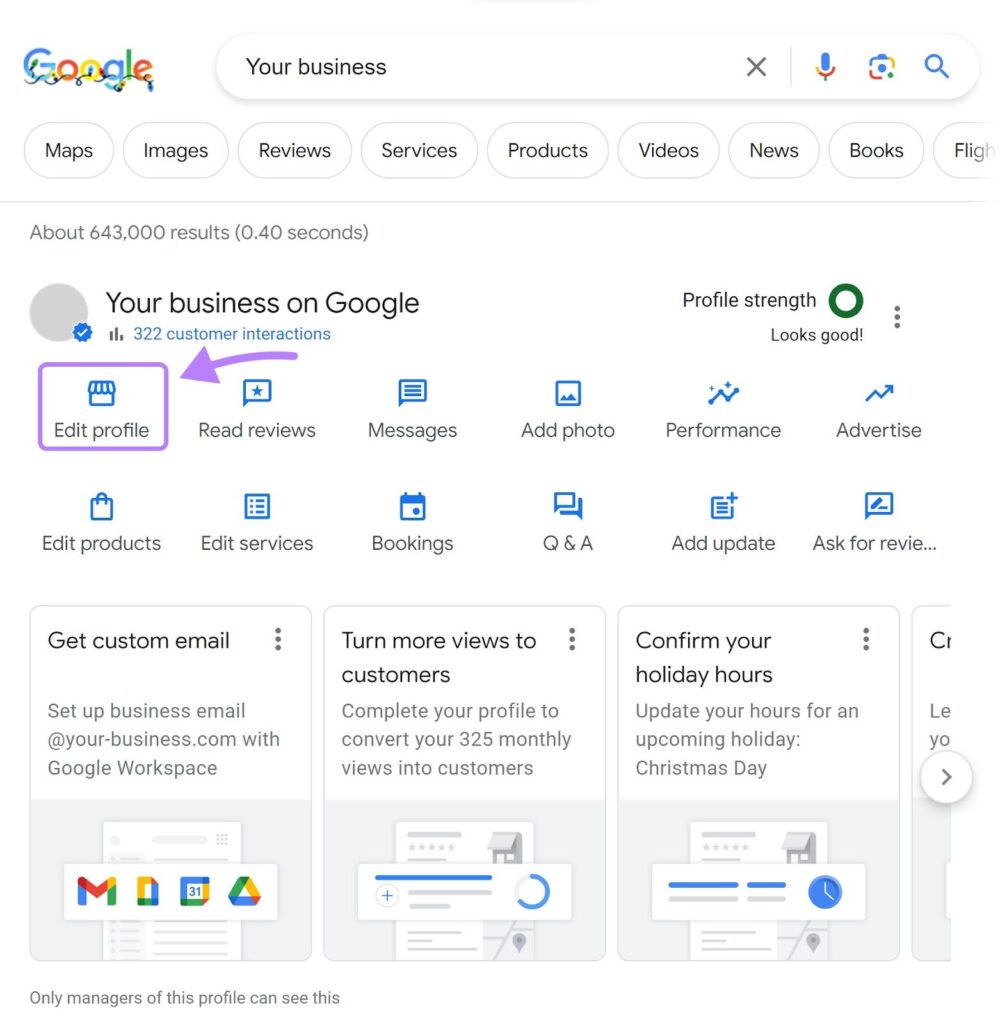
2. Search your business name on Google, or open it in Google Maps.
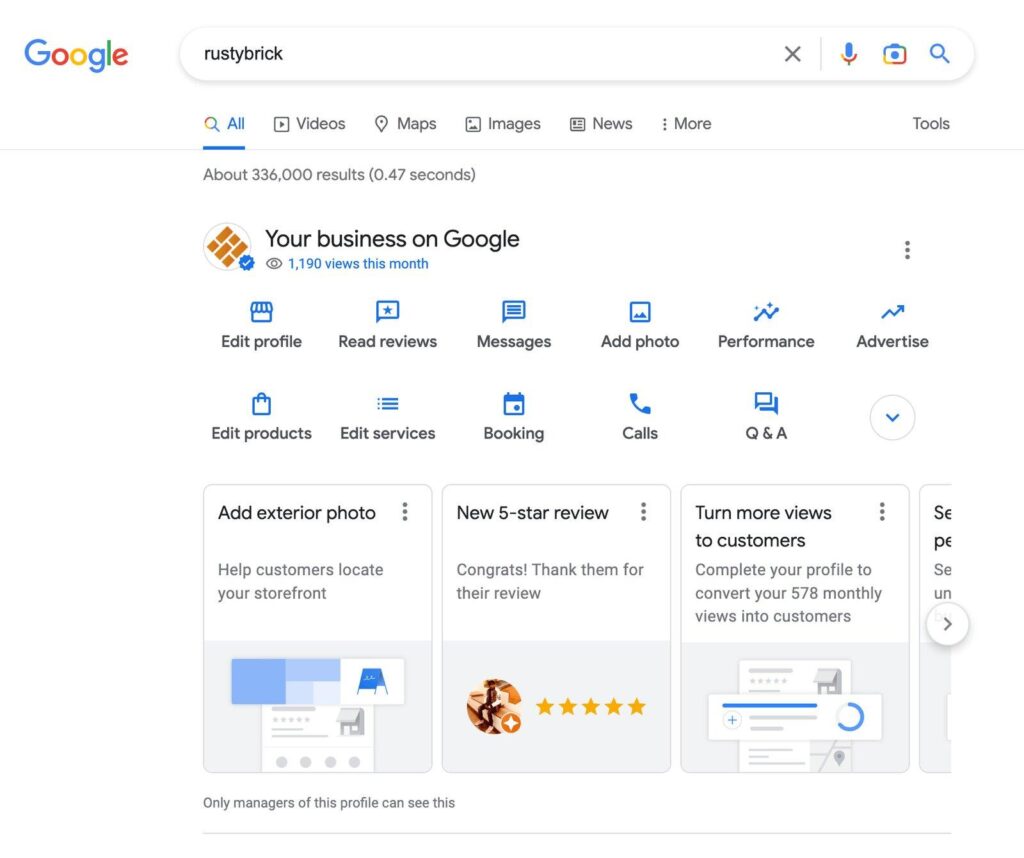
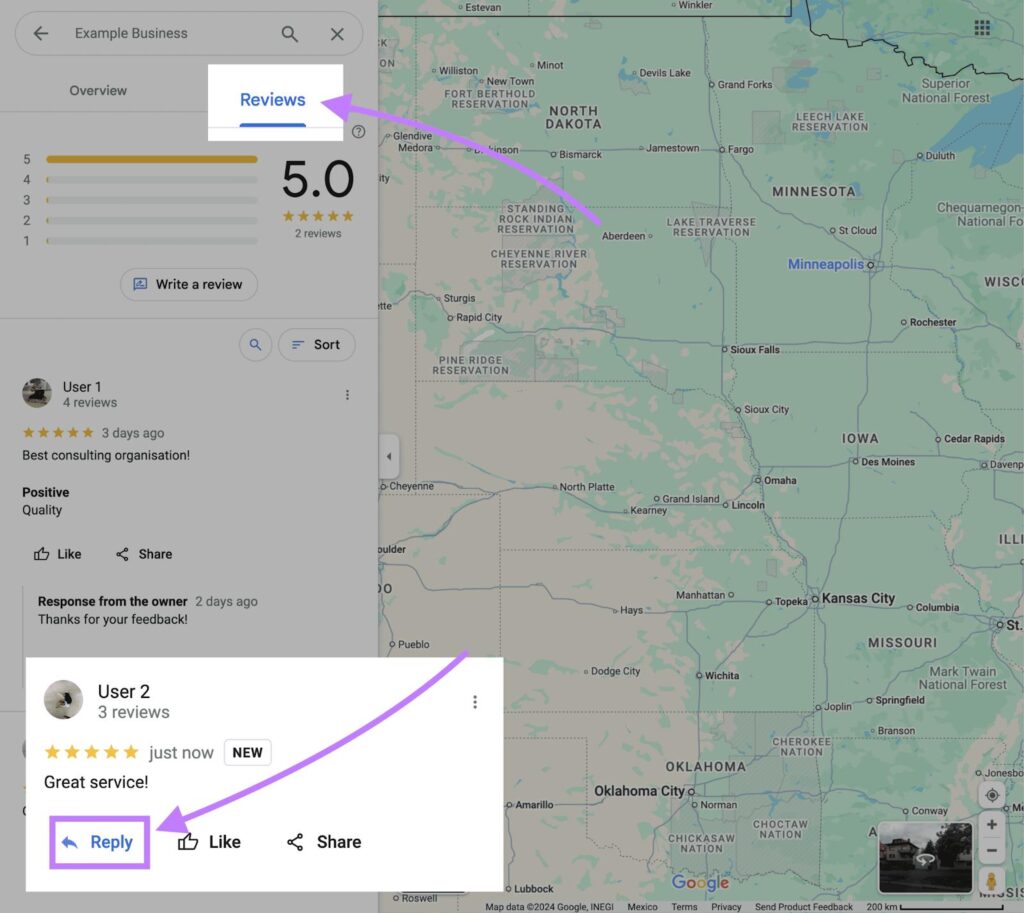
3. Select Reviews (or Read reviews).
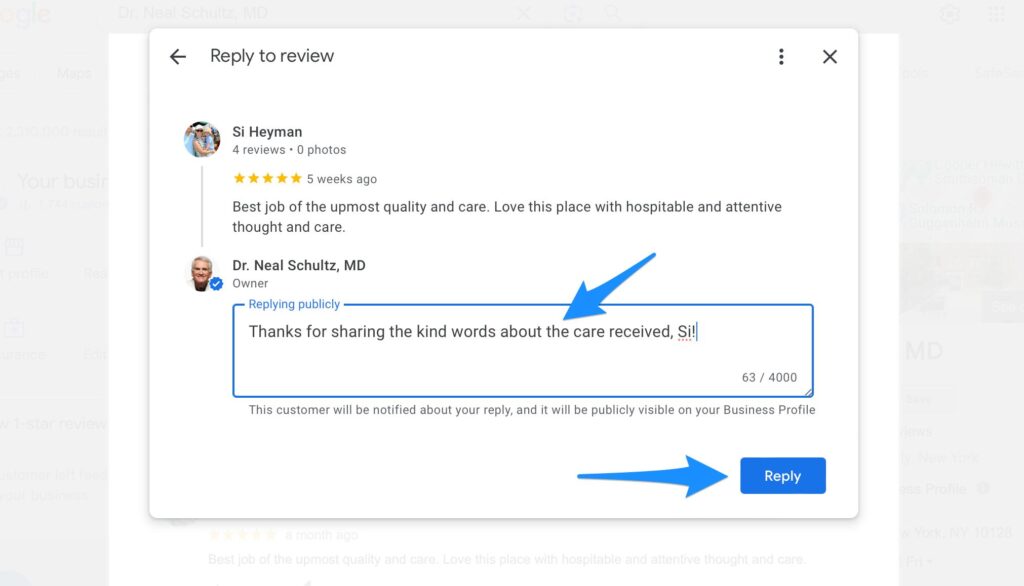
4. Click Reply under the review, write your response, and click Reply again.
On a phone
1. Open the Google Maps app and sign in with the managing account.
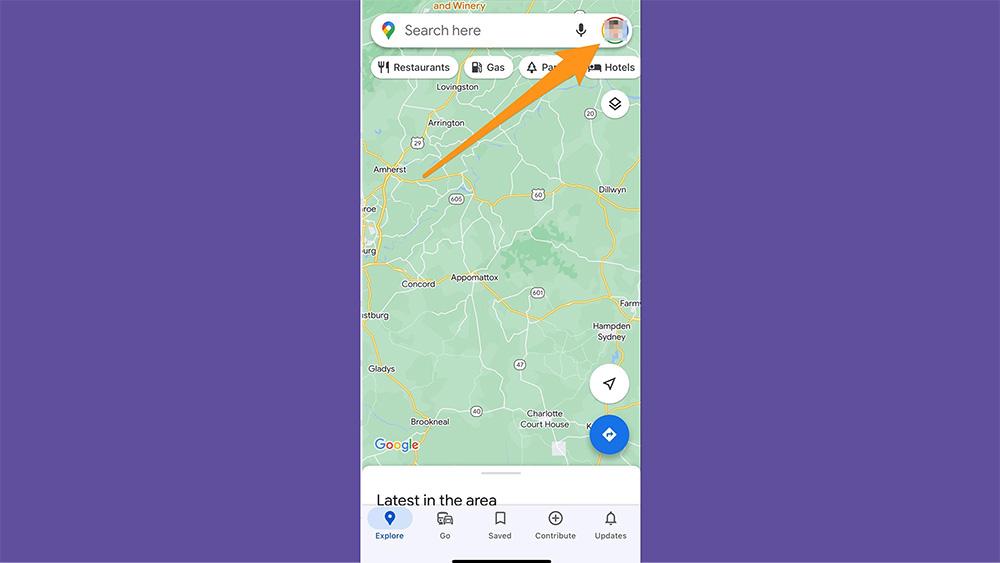
2. Tap Business on Android, or your profile picture and then Your Business Profile on iPhone.
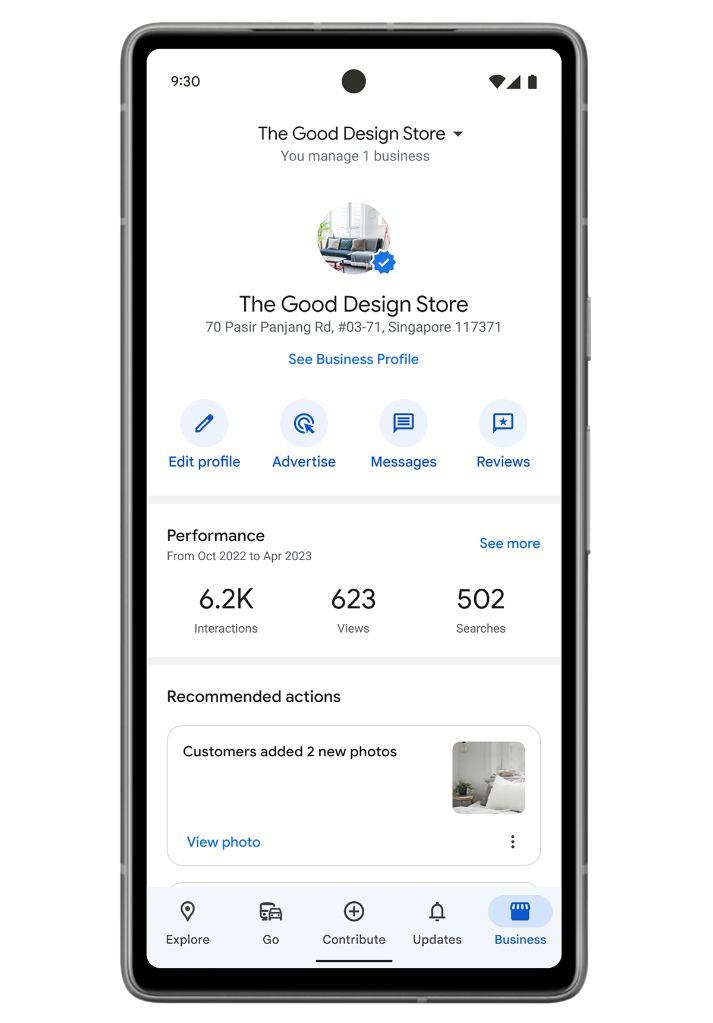
3. Tap Reviews, find the review, and tap Reply.
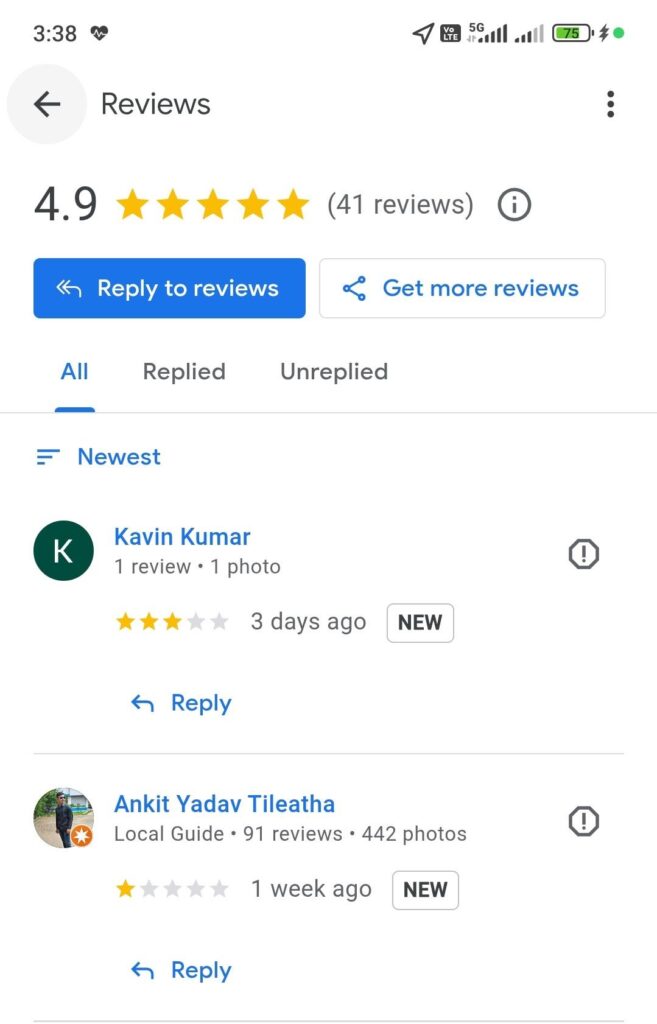
Menu labels change, so follow what you see. Your reply appears under the review as a response from the owner.
A 5-Step Framework for Every Review Response
- Thank them by name.
- Echo one specific detail from the review.
- Own the problem or explain briefly. No excuses, no arguments.
- Offer an offline next step, such as a phone number or email.
- Sign with your name. Google advises it, because it makes the reply feel authentic.
Use this routine every time you respond to Google reviews. Short review responses work best. Match the voice to your brand, but keep complaints serious. Here is one review in three voices:
| Voice | Reply to “Waited 40 minutes for a haircut” |
|---|---|
| Friendly | “Thanks for telling us, Jess. A 40-minute wait isn’t how we want your visit to start, and we’re sorry. Please email Dana at [email] so we can make it right.” |
| Professional | “Thank you for your feedback. We apologize for the wait on [date]. Please contact our manager at [ phone ] so we can review what happened.” |
| Playful (light reviews only) | “Your hair deserved better than a waiting-room view! We’re sorry about the wait and fixing our schedule. Ping Dana at [email].” |
Google Review Response Examples: 20 Templates
Use these templates, which double as feedback response examples, to respond to Google reviews at every star level. Swap each [bracket] for real details, and never paste a template unchanged.
★★★★★ Five stars
★★★★☆ Four stars
★★★☆☆ Three stars
★☆ One or two stars
Need more depth for angry customers? See our guide to how to respond to negative reviews.
Unfair but genuine reviews
Suspected fake or policy-violating reviews
Using AI to Respond to Google Reviews Faster
AI can draft replies quickly, but customers can tell a canned answer. These are our recommendations, not Google rules:
| Do | Don’t |
|---|---|
| Use AI for a first draft, then add one real detail from the review. | Paste unedited drafts, or reuse identical wording across replies. |
| Check names, dates, and policies before posting. | Include private details about the reviewer. |
| Sign with your name, as Google advises. | Offer anything in exchange for changing or deleting a review. |
| Keep a human in charge of complaints. | Use AI to write reviews or testimonials. The FTC’s 2024 rule covers AI-generated fake reviews. |
When to Flag a Review Instead of Replying
You should respond to Google reviews that are honest, even harsh ones. Flag a review when it breaks Google’s review policy: it isn’t based on a real experience, comes from a competitor or an employee, is spam or off-topic, or contains harassment or private information. Use the Reviews Management Tool, as explained on Google’s help page. You may add a brief, neutral reply while the report is pending.
Healthcare and legal businesses: never confirm the reviewer is a patient or client. After HHS announced a $23,000 settlement with a dental practice in December 2022 over patient details in review replies, its Office for Civil Rights said providers cannot disclose patient information when answering negative reviews. Use a generic reply: “Thank you for your feedback. We can’t discuss any individual’s care online, but we welcome a call at [ phone ].” Attorneys have confidentiality duties under their state bar rules, so check yours. This is general information, not legal advice.
Does Responding to Reviews Help SEO?
Google lists relevance, distance, and prominence for local ranking, and says review count and score factor in. It doesn’t list replies as a ranking factor, so treat them as a trust and service tool, not a ranking trick. What you can influence is the number and quality of reviews. Ask every customer with the review link or QR code from your Business Profile, never filter who gets asked (review gating), and never offer rewards. Google’s policy and the FTC’s rule target both. Steady asking builds review velocity, the pace of new reviews. See how to ask customers for reviews.
How to Respond to Google Reviews: FAQ
How do you respond to reviews on Google?
Verify your Business Profile, open Reviews while signed in, click Reply, write a short personal answer, and sign it.
How quickly should I reply?
Google advises responding in a timely manner and doesn’t set a number. Pick a window you can keep, such as two business days.
Will the reviewer see my reply?
Yes. Google notifies the reviewer, who can then update their review.
Can I offer a discount in my reply?
No. Google bans incentives to change or remove a review, so keep replies conversational.
Should I reply to every review?
Aim to. Answer negative and mixed reviews first, and keep praise replies short and specific.
Can I reply to a fake review?
Report it first. If it stays up, post a brief, neutral reply that invites a real customer to contact you.
Sources: Google: manage customer reviews; Google: report reviews; Google Maps content policy; Google: local ranking; HHS OCR news release, Dec. 2022; FTC fake-reviews rule; BrightLocal 2026 survey.