



A bad review sits on your Facebook Page, and the delete button isn’t there.
To delete a review from Facebook, you must be the person who wrote it: open your recommendation, select its three-dot menu, and delete it. Page owners can’t delete other people’s reviews. They can report ones that break Meta’s rules, or reply.
Here are the steps for both, plus reply templates and legal options.
Can you delete a review from Facebook?
Only the reviewer or Meta can remove a Facebook review. Reviewers can delete their own at any time. Page owners can’t delete anyone else’s review, but they can report it, and Meta may remove it only if it breaks its Community Standards.
Since 2018, Facebook has used Recommendations (a Yes or No, with optional text and photos) instead of star ratings, though older reviews can still appear. A recommendation is a post its author owns. Meta says it doesn’t verify that reviewers actually used the business, so a false or unfair review isn’t removed just for being wrong.
| You are… | Can you delete it? | Your best move |
|---|---|---|
| The reviewer | Yes, anytime | Delete it or change its privacy |
| The Page owner or admin | No | Report it if it breaks the rules. Otherwise, reply. |
| Meta | Yes, if it breaks its standards or spam policy | Report, then wait |
The same logic applies on Google, where only the reviewer or Google can remove a review. See our guide to how to delete review google.
How to delete a review from Facebook that you wrote
Your recommendation is an ordinary post, so you can delete it the same way as anything else you shared. Menu labels change, so look for the three-dot menu on your recommendation.
On a computer
1. Open the business’s Facebook Page and click Reviews.

2. Find your recommendation, or open it from your own profile.

3. Click the three-dot menu on your recommendation.
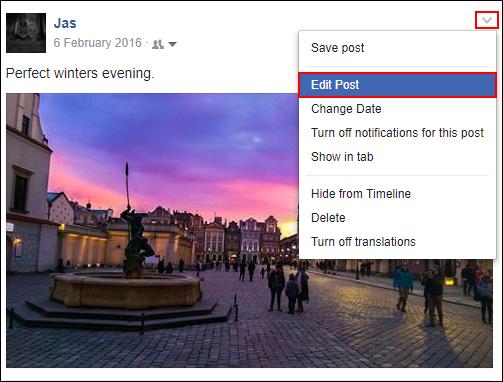
4. Choose Delete post and confirm.

On iPhone or Android
- Open the Facebook app and go to the business’s Page, then tap Reviews.
- Find your recommendation.
- Tap the three-dot menu next to it.
- Tap Delete and confirm.
Prefer to keep it but change who sees it? Use Edit privacy. Per Cloutly’s September 2026 summary of Meta’s help pages, only public recommendations feed a Page’s rating.
How to report a review about your Page
Reporting is the only removal route Meta documents for Page owners:
1. Click Reviews under Details below your Page cover photo.

2. Tap See all next to Recent reviews.

3. Click Options in the top right corner of the review.

4. Select Report post and follow the on-screen prompts.

One catch: Meta says recommendations that include only a star rating can’t be reported. Reviews collected from your Meta ads are reported in Meta Business Suite instead, under Ratings and reviews.
Which Facebook reviews qualify for removal
Meta judges a report against its Community Standards, not against fairness. Report categories reported by review-management guides include hate speech, harassment, off-topic content, and conflict of interest.
| Likely eligible for removal | Usually not eligible |
|---|---|
| Hate speech or discriminatory language | A harsh but honest account of a real visit |
| Harassment of a specific person | A review you think is unfair or exaggerated |
| Spam or a burst of ratings from empty accounts | A complaint about price, wait, or service |
| Off-topic content or a review of the wrong business | A claim you can’t prove false |
| Conflict of interest, such as a competitor or someone affiliated with the Page | A review from someone you believe wasn’t a customer |
Meta tells reviewers not to leave a recommendation for a business whose Page they help manage. Yelp and other platforms have different guidelines, so see our guide to how to delete a review on yelp.
Timeline, appeals, and what to do if your report is denied
Meta publishes no timeframe for reviewing Page recommendations and, as far as we found, no appeal form for them. Check your Page rather than waiting for a confirmation. Only reviews linked to your ads show a status in Meta Business Suite, moving from Published to Pending while Meta assesses them.
If you can’t delete a review from Facebook, these options help:
- Reply publicly and move the details offline (templates below).
- Block the profile if it keeps posting. Blocking stops new activity but doesn’t remove what’s already posted.
- Earn more real reviews. One hostile rating matters less among many honest ones. See google reviews for business.
- Turning Recommendations off is a last resort. Meta says it removes the rating and reviews from your Page, including the good ones.
If a burst of one-stars arrives with a demand for money, don’t pay or reply. Keep the message, report the reviews, and contact local police or your consumer regulator. Google has a dedicated extortion form, but we found no equivalent for Facebook Pages.
Reply professionally instead of deleting: 3 templates
A calm reply is read by everyone who comes after it. Thank the reviewer, stay factual, and move details to a private channel. Never share private customer details, and never offer anything in exchange for a changed review. For more, see how to respond to negative reviews.
Template 1 · Honest negative review
“Hi [Name], thank you for telling us. I’m sorry [specific issue] fell short. I’d like to understand what happened. Please call me at
or message us here. [Your name], [Business]”Template 2 · Review with a factual error
“Hi [Name], thanks for your feedback. We can’t find a record of [detail], and we’d like to look into it. Please message us with your visit date so we can help. [Your name], [Business]”
Template 3 · Suspected fake review you’ve reported
“Hi, we can’t match this review to a visit or order, and we’ve reported it to Facebook. If we’ve missed something, please message us so we can help. [Your name], [Business]”
Don’t publicly accuse a reviewer of lying. The FTC’s 2024 rule bars unfounded legal threats, intimidation, and certain false accusations aimed at removing negative reviews.
Legal removal requests: your last resort
Not legal advice. This section is general information. Laws vary by state and country, so talk to a qualified attorney about your situation.
A review can be removed for legal reasons only if it breaks the law, not just a platform rule. In many places, defamation means a false statement of fact, not an opinion. “The owner is rude” is an opinion. “They charged my card twice,” when your records show otherwise, is a factual claim you can document.
- Gather evidence: a screenshot with the date, the review link, and records that contradict the claim.
- Quote the exact statement you say is false.
- Ask a lawyer first. In the U.S., federal law generally shields platforms from liability for what users post, so legal action usually targets the author, and poorly handled threats can backfire.
- Be wary of guarantees. Only Meta or the reviewer can remove a review, so promises of certain removal are overselling.
How to delete a review from Facebook: FAQ
Can a Page owner delete a Facebook review?
No. Only the person who wrote it, or Meta, can remove a Facebook recommendation. As a Page owner, you can report one that breaks Meta’s standards and reply to it.
Why can’t I report a one-star Facebook review?
Meta says recommendations that include only a star rating can’t be reported. Meta’s own spam enforcement is the route for removing those.
How long does Facebook take to remove a reported review?
Meta publishes no timeframe for Page recommendations, so check your Page rather than waiting for an email. Reviews linked to your ads show a status in Meta Business Suite.
Does Facebook verify that a reviewer was a customer?
No. Meta states it doesn’t verify that people purchased or used the service they review. That is why an unfair review often isn’t removed.
Can I turn off Facebook reviews?
Yes, but Meta says turning Recommendations off removes the rating and reviews from your Page, including the good ones. Consider it only as a short-term step during a coordinated attack.
Can I delete my own Facebook review?
Yes. A recommendation is your post, so you can delete it from the three-dot menu on the recommendation, or change who can see it with Edit privacy.
Dealing with negative reviews?
Our online reputation management service helps you reply, report, and build a stronger rating.
Sources (checked October 24, 2026): Meta Help: report a Recommendation; Meta Help: turn Recommendations on or off; Meta Help: edit privacy; Cloutly: how to remove a review from a Facebook Page (Sep 6, 2026); FTC, 16 CFR Part 465 (2024). Meta changes menus and policies often, so verify each step in your own account.