



Your business closed, moved, or was listed by mistake, and it still shows on Google Maps.
To remove a business from Google Business Profile, sign in as an owner, open Business Profile settings, select Remove Business Profile, choose Remove profile content and managers, and confirm. If the business closed, mark it permanently closed first. The listing may still appear on Google for a while.
Here’s which option fits, the steps, fixes, and what comes next.
Dated steps: Google changes menus often. These steps were checked on October 30, 2026 against Google’s Business Profile Help page on removing a profile, and you should confirm each one in your own account. The new name for Google My Business is Google Business Profile.
Which option do you need?
Pick the option that matches your situation. If the business closed, mark it permanently closed. If you no longer want to manage it, remove the profile content and managers. If you don’t own the listing and it never existed or isn’t eligible, request removal with Suggest an edit.
| Your situation | What to do | What happens |
|---|---|---|
| The business closed for good | Mark it permanently closed | The profile stays visible with a clear closed label |
| You don’t want to manage it anymore | Remove profile content and managers | You lose control. The business may still show on Google. |
| The listing never existed or isn’t eligible | Suggest an edit: Place is closed or not here | Google reviews your request |
| You moved | Update the address. Don’t remove. | You keep your reviews and history |
Who can remove a Business Profile, and when you shouldn’t
Owners of the profile can remove it from Business Profile settings. Google says new owners or managers must wait 7 days before they can remove profile content and managers. Check Google’s page on ownership permissions if you’re unsure which role you hold.
- Storefront: if you close the location, mark it permanently closed. If you move, update the address so you keep your reviews and history.
- Service-area business: if you stop serving an area, update your service area. Remove the profile only if the business itself ends.
- Not the owner: you can still request removal if the business never existed or isn’t eligible to show on Google.
Hold off if you only want to hide a bad review or change a category. Removal doesn’t fix either, and it can cost you your profile. For review problems, see our guide to google reviews for business.
How to remove a business from Google Business Profile
Option 1: Mark the business permanently closed
1. Sign in to the Google account that manages the profile and open your Business Profile.
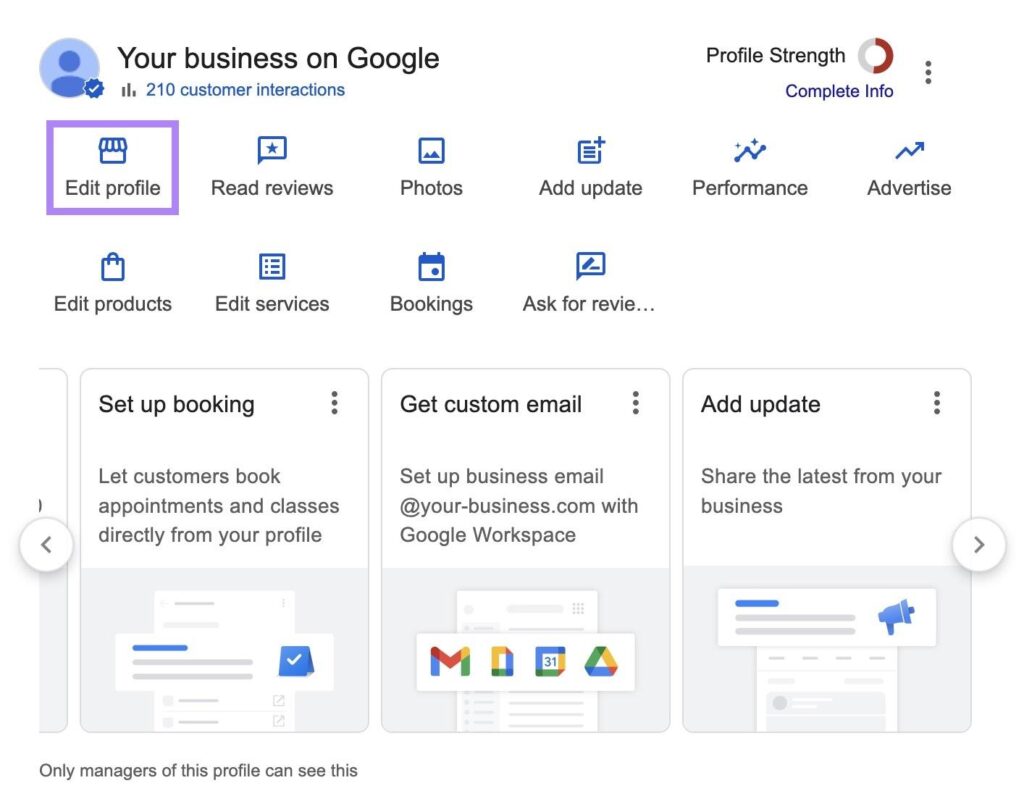
2. Select Edit profile, then open the Hours tab.
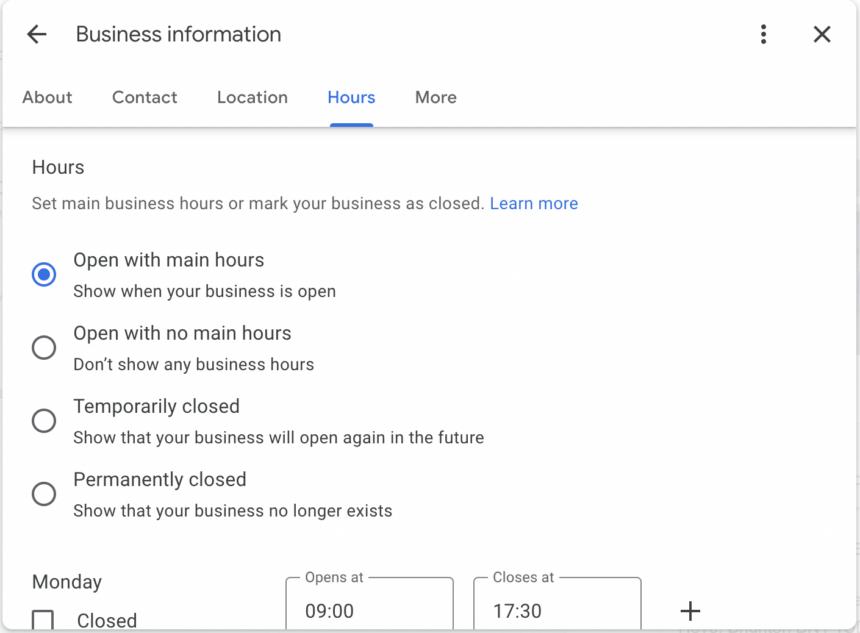
3. Choose Permanently closed and save.
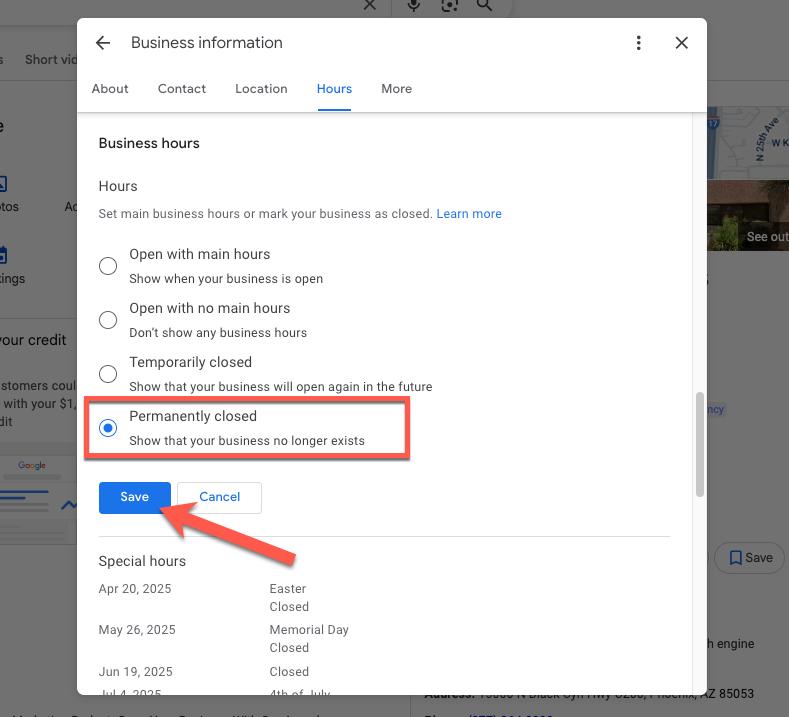
Google says a profile marked closed may still appear in Search and Maps, but it will clearly show that the business is closed, and it will slowly disappear from search results before it’s fully removed.
Option 2: Remove profile content and managers
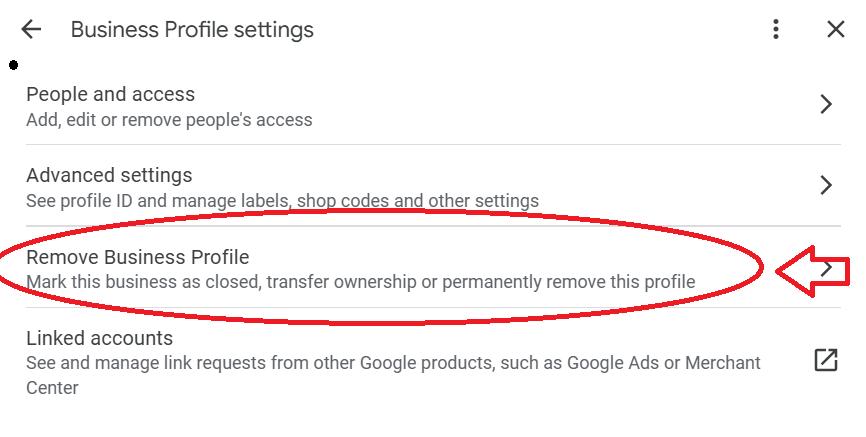
1. Open your Business Profile, then select More and Business Profile settings.
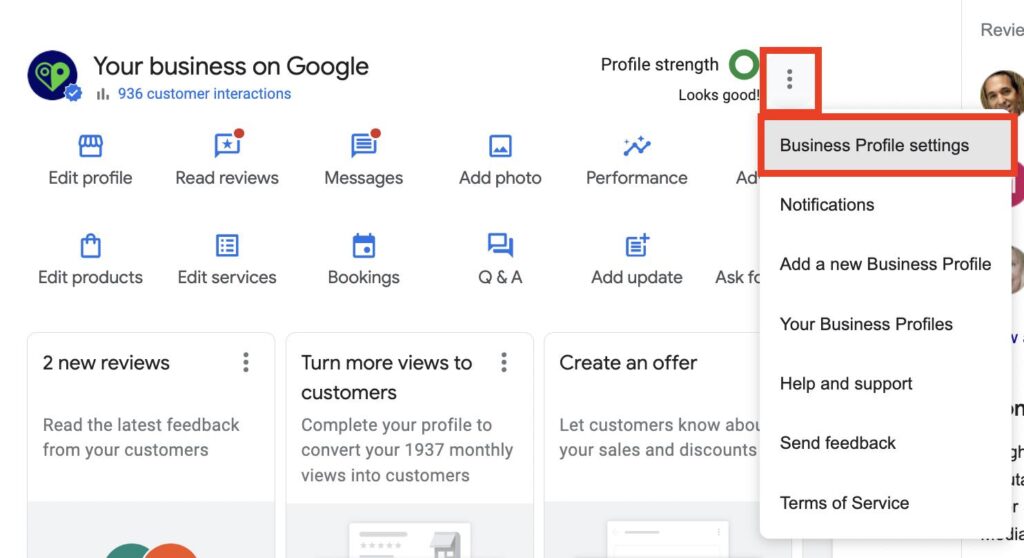
2. Select Remove Business Profile, then Remove profile content and managers.
3. If the business closed, turn on Mark your business as permanently closed first, to show that it no longer exists.
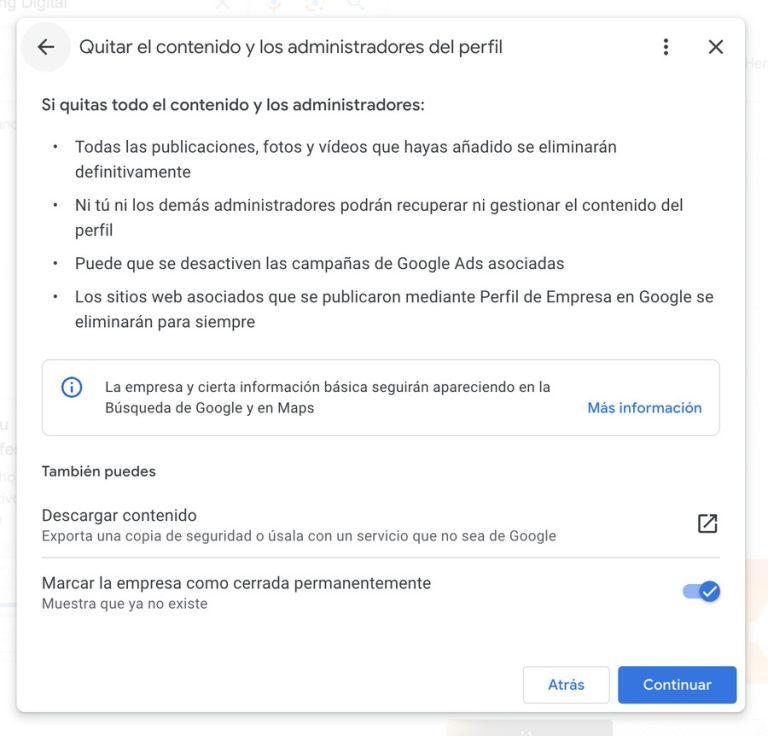
4. Select Continue, then Remove, then Done.
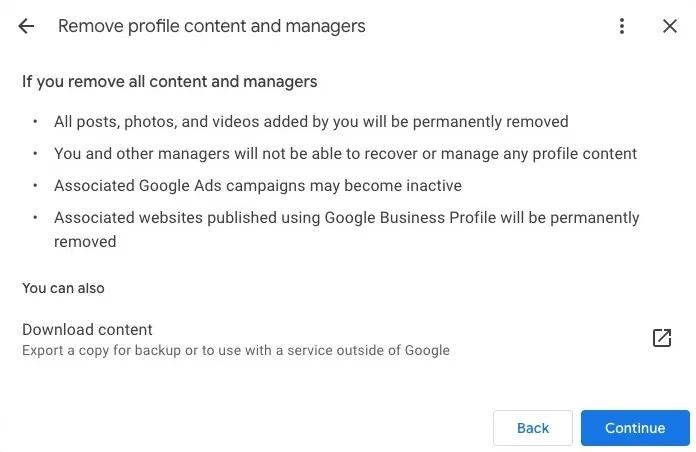
Per Google’s page, you won’t be able to manage the business directly through Search or Maps afterward, but the business may continue to show up on Google. For several locations, sign in to Business Profile Manager, open Actions, and choose Remove businesses.
Option 3: Request removal of a business you don’t own
1. On a computer, find the business on Google Maps.
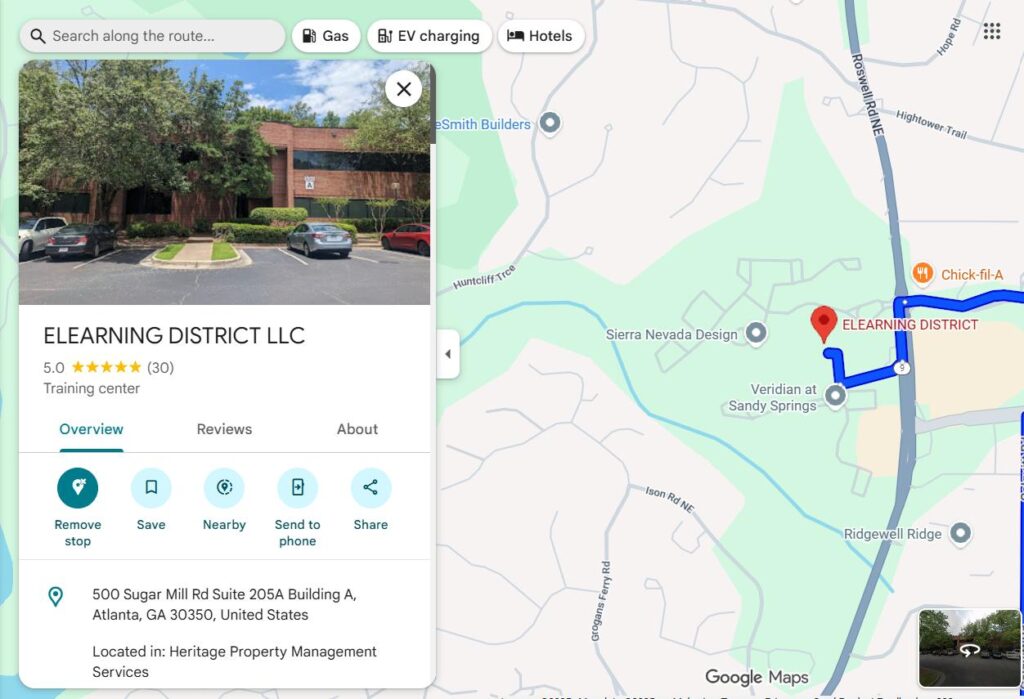
2. Select Suggest an edit, then Place is closed or not here.
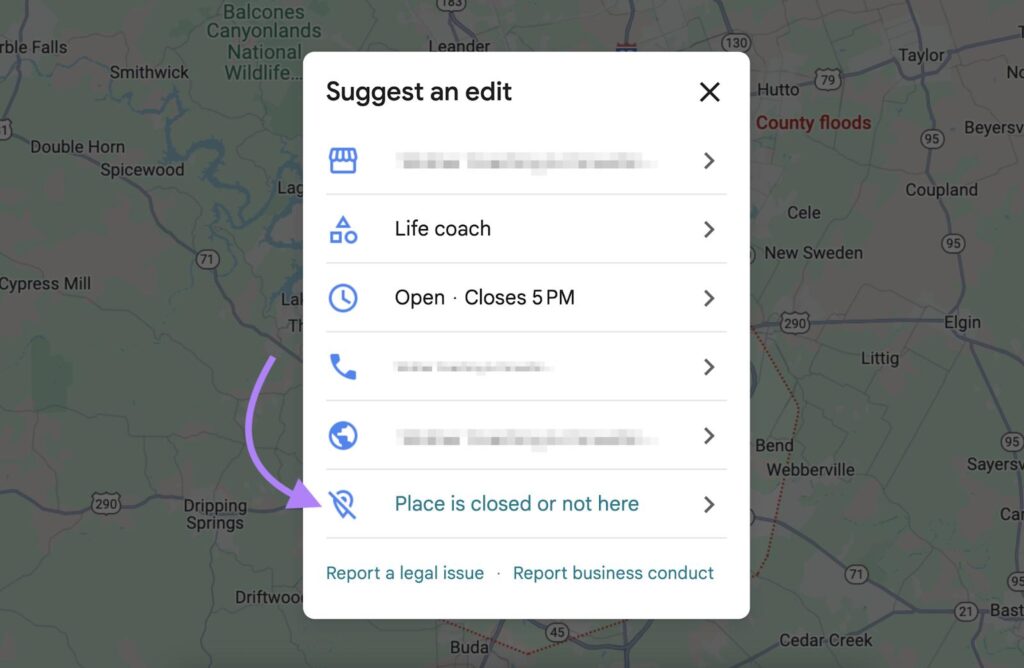
3. Choose the reason that fits and select Submit.
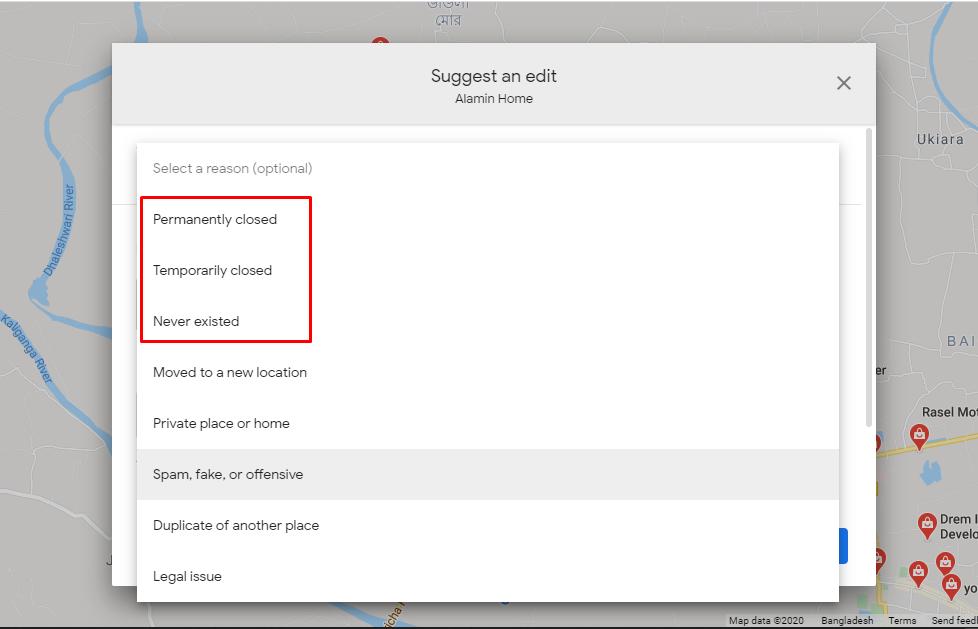
Google says you can request removal if the business never existed or isn’t eligible to show on Google. Google may email you with follow-up questions, as described in this guide. Eligibility rules, such as no mailbox addresses or online-only businesses, are in Google’s guidelines.
Removal is hard to undo. You may lose control of reviews, photos, and your profile history. If you may reopen or move, mark it closed or update the details instead.
Common problems and how to fix them
| Problem | Likely cause | Fix |
|---|---|---|
| No Remove option | You aren’t an owner, or you became one in the last 7 days | Wait out the 7 days or ask the primary owner to remove it |
| Listing still shows after removal | Google says the business may continue to show up | Make sure it’s marked closed, then use Suggest an edit if it never existed or isn’t eligible |
| Reviews and photos still visible | The public listing remains even without a manager | Reviews stay with the listing. See the FAQ below. |
| You moved, not closed | Removing loses history | Update the address in your profile and reverify if asked. See google business verification. |
| A duplicate profile exists | Two listings for one location | Keep the one you verified and request removal of the duplicate |
| Profile is suspended | A guideline issue, such as a keyword-stuffed name | Fix the issue and use Google’s suspension appeal, rather than removing it |
How long it takes and what to do next
Google doesn’t publish a guaranteed timeline. It says a profile marked closed won’t vanish from Maps right away and will slowly leave search results before it’s fully removed. One third-party guide from Synup reports a response to removal requests within about 14 days, so treat that as a rough guide.
- Update other listings: mark the business closed or fix the address on Apple Maps, Bing, Yelp, Facebook, and directories, since stale listings confuse customers. Keep your name, address, and phone consistent.
- Tell customers: post a notice on your website, social profiles, and storefront.
- Redirect your site: point the old address or domain to a page that explains the closure or move.
- Cancel related ads and tools that use the profile.
Checklist if you keep the profile or open a new one
If you moved or reopened, use the profile you keep to rank properly. Google says local results are mainly based on relevance, distance, and prominence, per its help page, so complete every detail:
- ☐ Verify the correct profile, by video, phone, or other method Google offers.
- ☐ Primary category: the most specific one that fits.
- ☐ NAP: name, address, and phone identical on your website and listings.
- ☐ Citations: correct or remove old directory entries.
- ☐ Photos and GBP posts: show the new location or hours.
- ☐ Reviews: ask every customer for an honest review.
For the full ranking playbook, read how to rank higher on google maps, and for the optimization side, see search engine optimization google my business. Want help? Our Google Maps SEO service can clean up and rebuild your profile, and we offer it ourselves, so compare your options.
How to remove a business from Google Business Profile: FAQ
Is Google My Business the same as Google Business Profile?
Yes. Google renamed Google My Business to Google Business Profile. You now manage your profile in Google Search and Maps.
Can I delete a Google Business Profile completely?
You can remove your profile content and managers, which ends your management. Google says the business may still continue to show up on Google, so removal doesn’t guarantee the listing vanishes.
What’s the difference between marking a business closed and removing it?
Marking it permanently closed keeps the profile visible with a clear closed label. Removing profile content and managers ends your control. If you want the closure shown, turn on the closed option first.
How do I remove a business I don’t own?
If the business never existed or isn’t eligible to show on Google, find it on Google Maps, choose Suggest an edit, then Place is closed or not here, and submit. Google may email you with follow-up questions.
How long does it take to remove a business from Google Maps?
Google says a business marked closed won’t disappear from Maps right away and will slowly leave search results before it’s removed. Google publishes no guaranteed timeline, and one third-party guide reports a response within about 14 days for removal requests.
Will removing my profile delete my reviews?
Not necessarily. The listing may continue to show on Google, and its reviews and photos may remain visible. If you moved rather than closed, update your address instead of removing the profile.
Sources (checked October 30, 2026): Google Business Profile Help: remove a Business Profile; Google: guidelines for representing your business; Google: local ranking; Lilach Bullock: how to remove a business from Google; Synup: delete and remove Google Maps listings. Google changes its menus often, so verify each step in your account.