

Customers are getting pickier. BrightLocal’s 2026 survey found that 41% of consumers now “always” read reviews, up from 29% the year before, and 68% will only use a business with four or more stars, up from 55%.
To get more Google reviews, make asking part of every customer visit: send your direct review link or QR code right after a good experience, ask everyone rather than only happy customers, and never offer rewards. This guide shows how to find your link, 12 policy-safe ways to ask, and 10 scripts you can copy. For the full picture, read our guide to google reviews for business.
Why Google Reviews Matter for Rankings and Conversions
Google says local results are based primarily on relevance, distance, and prominence, and that review count and review score factor into local ranking. It also notes there’s no way to request or pay for a better local ranking. In practice, reviews are one of the few ranking inputs you can influence every week.
They also decide whether a searcher picks you. In BrightLocal’s 2026 Local Consumer Review Survey (published February 11, 2026, 1,002 US adults):
- 97% of consumers read reviews for local businesses.
- 47% won’t use a business with fewer than 20 reviews.
- 74% only care about reviews written in the last three months.
- 31% will only use a business rated 4.5 stars or higher.
So you need reviews that are plentiful, recent, and steady. Our post on the important of google review business goes deeper.
How to Get Your Google Review Link and QR Code
As of October 2026, Google’s Help Center describes these steps. Menus change, so follow the labels you see.
1. Sign in to your Google Business Profile on a computer.
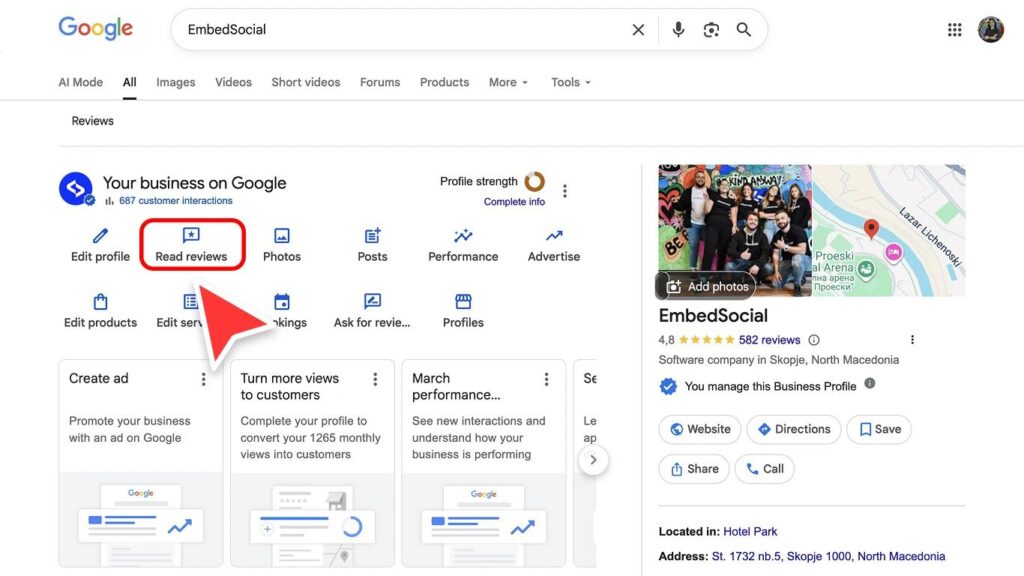
2. Select Read reviews, then Get more reviews (the share icon).
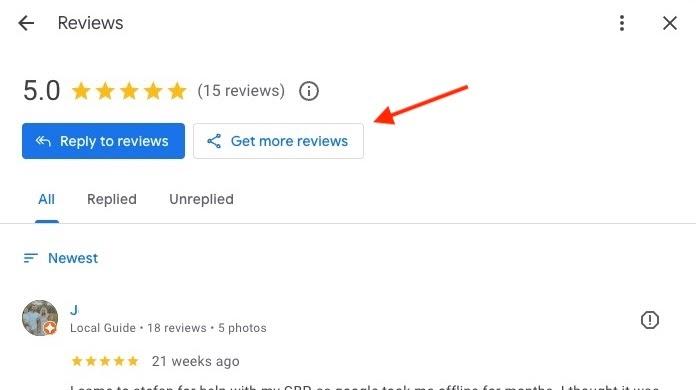
3. Copy the review link, or right-click the QR code and choose Save image as.
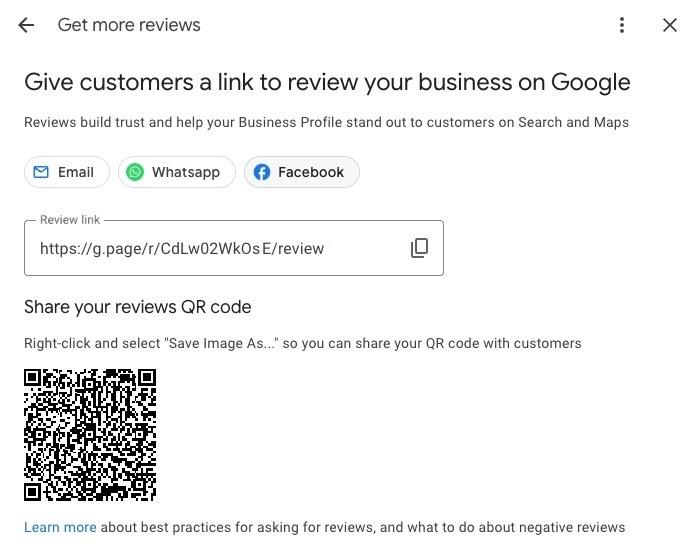
Google notes that QR codes can currently be created only in a computer browser, not on mobile. Customers must be signed in to a Google Account to post, so a short note like “you’ll need to be signed in to Google” saves confusion.
12 Policy-Safe Ways to Ask, With 10 Scripts
The best time to ask is right after a good moment: a finished job, a great meal, a solved problem. BrightLocal found that 28% of consumers say they’ll always write a review when asked, up from 16% in 2025, so asking works. For more on timing, see how to ask customers for reviews.
In person
1. Ask at the moment of delight. Ask when the customer says thank you, and keep it casual.
Script 1: “I’m so glad that worked out. If you have a minute, an honest Google review really helps neighbors find us.”
2. Hand over a card with the QR code. Keep it low-pressure, and don’t hover while they scan.
Script 2: “Here’s our review link, in case you’d like to share your experience. No pressure either way.”
3. Display a QR sign. Google itself suggests printing the QR code for your store.
Script 3 (sign text): “Enjoyed your visit? Scan to share your experience on Google.”
Text and chat
4. Send a same-day text. Text only customers who agreed to receive texts, and treat it as a marketing message with an opt-out unless your attorney advises otherwise.
Script 4: “Thanks for visiting [Business] today! If you have a minute, an honest review helps others find us: [link]. Reply STOP to opt out.”
5. Follow up once. One gentle reminder a few days later is enough. Never send a third.
Script 5: “Hi [first name], a quick reminder in case you’d like to share your experience: [link]. Thank you either way! Reply STOP to opt out.”
6. Ask at the end of a chat. Google lists this as a good moment, and its Help page says you can share the link by email, WhatsApp, or a Facebook post.
Script 6: “Glad we could help! If you’d like to share your experience, here’s our review link: [link].”
Email and print
7. Add the link to your thank-you email. Google recommends this too.
Script 7: “Thank you for choosing [Business]. If you have a moment, we’d appreciate an honest review: [link].”
8. Print it on receipts and invoices. Another placement Google suggests.
Script 8: “Tell us how we did: [short link or QR].”
9. Put it in your email signature. A quiet, always-on reminder.
Script 9: “Happy with our work? Share your experience on Google: [link].”
Make it automatic
- 10. Automate the follow-up. Trigger one message after each completed job or visit, and one reminder. BrightLocal recommends automating requests by email or SMS.
- 11. Ask past customers in small batches. Include only people who opted in.
- 12. Share the link on social. A short post works as a standing invitation.
Script 10 (batch email): “Hi [first name], we’d love to hear how we did. If you have a minute, you can share your experience here: [link]. Thank you!”
What Not to Do: Google Policy and FTC Rules
Google’s Maps user-generated content policy says merchants must not:
- Offer incentives, such as payment, discounts, or free goods and services, in exchange for a review.
- Discourage negative reviews, or selectively solicit positive ones. That’s review gating.
- Require or pressure customers to review while on the premises, or ask for specific content.
- Set staff quotas for reviews, or ask staff to solicit reviews that name them.
Google does allow you to ask for reviews that reflect a genuine experience, without offering incentives or trying to influence the rating or content.
The FTC rule on fake reviews and testimonials, announced August 14, 2024 and effective October 21, 2024, goes further. It bans buying fake reviews, giving compensation or incentives conditioned on a positive or negative sentiment, undisclosed insider reviews, and review suppression through groundless legal threats or intimidation. The FTC can seek civil penalties against knowing violators.
Enforcement is real. In January 2022 the FTC announced a $4.2 million settlement with retailer Fashion Nova, which it said held back reviews below four stars out of five for years. It was the agency’s first case about concealing negative reviews. If you collect private feedback, send the public link to everyone, not only to people who say they’re happy.
Reply to Every Review
Replies are part of your reputation. BrightLocal’s 2026 data shows that 89% of consumers expect a response, 80% say they’re likely to use a business that responds to all reviews, and templated replies put off 50%. Google’s own tips say to keep replies short, personal, and conversational, to avoid using them for deals, and to protect the reviewer’s privacy.
- Reply within a day or two, and mention something specific from the review.
- Thank the reviewer, and offer to continue a complaint by phone or email.
- Never share personal details, even if the reviewer did. Our guide to how to respond to negative reviews covers tough cases.
Track What Matters
Check these once a month:
- Review velocity: new reviews ÷ weeks. Aim for a steady pace, not spikes.
- Star rating: your average, compared with the 4.0 and 4.5 thresholds BrightLocal’s respondents mention.
- Reviews with text: reviews with comments ÷ all new reviews. Written reviews give readers more to trust.
- Request-to-review rate: reviews received ÷ requests sent, so you can test which ask works best.
- Reply rate and speed: the share of reviews answered, and how quickly.
Examples by Industry
The salon and restaurant scenarios below are made-up illustrations. The dental case is a documented enforcement action.
Salon. Picture a salon that texts a review link the afternoon after an appointment, with one reminder a few days later, only to clients who opted in. Stylists don’t have review quotas, and nobody is told what to write.
Restaurant. Imagine a restaurant that prints a QR code on the receipt and a small table sign. Servers don’t push guests to post while they’re still at the table, which follows Google’s rule against pressuring customers on the premises.
Dental practice. Replies carry legal risk. In October 2019, the U.S. Department of Health and Human Services’ Office for Civil Rights announced a $10,000 settlement with Elite Dental Associates in Dallas, which had disclosed patients’ health information in responses to Yelp reviews. The practice also agreed to two years of monitoring. The lesson: thank reviewers generically and never confirm a patient’s treatment or details.
FAQ: Getting More Google Reviews
How do I get my Google review link?
In your Business Profile on a computer, select Read reviews, then Get more reviews, and copy the link or save the QR code.
Can I ask customers for Google reviews?
Yes. Google allows requests for genuine reviews, as long as you offer no incentives and don’t steer the rating or content.
Do Google reviews help my local ranking?
Google says review count and score factor into local ranking, alongside relevance and distance. It also says you can’t pay for a better ranking.
How many reviews do I need?
There’s no official number. In BrightLocal’s 2026 survey, 47% of consumers wouldn’t use a business with fewer than 20 reviews, so treat 20 as a floor and keep going.
Can I remove a negative review?
Only if it violates Google’s policies, in which case you can flag it. You can’t remove a review just because it’s negative, and you shouldn’t offer anything for its removal.
Is Google My Business the same as Google Business Profile?
Yes. Google renamed Google My Business to Google Business Profile, so use the new name when searching for help.
Make It a Habit, Not a Campaign
Pick two or three of the 12 ways, ask every customer, and review your numbers monthly. If you’d like help building the system, explore our Google review management support.
Sources (checked Oct 2026): Google Business Profile Help, Create a Google link or QR code to request reviews · Google Business Profile Help, Tips to get more reviews · Google Business Profile Help, How to improve your local ranking · Google Maps user-generated content policy · BrightLocal, Local Consumer Review Survey 2026 (Feb 11, 2026) · FTC press release on the final rule (Aug 14, 2024) · FTC, Fashion Nova order · CDA, Elite Dental Associates HHS OCR settlement (Oct 10, 2019). Google’s menus and policies change, and this article is general information, not legal advice. The salon and restaurant scenarios are illustrative.