



Patients often search for a dentist nearby before deciding where to book an appointment. Local SEO for dentists helps your practice appear in front of these high-intent searches on Google Search and Google Maps. This guide covers 15 proven strategies to improve local visibility, build patient trust, and attract more qualified leads to your dental practice.
What Is Local SEO for Dentists
Local SEO for dentists is the process of optimizing a dental practice’s online presence to appear higher in local search results, especially Google Search and Google Maps, when patients look for nearby dental services.
It focuses on improving location visibility, Google Business Profile optimization, patient reviews, local keywords, and website signals so search engines can match your practice with relevant patients in your service area.
15 Proven Local SEO Strategies for Dentists
Optimize Your Google Business Profile for Local SEO
Optimize your Google Business Profile (GBP) to improve local rankings and attract more patients from Google Search and Maps.
Focus on:
- Complete business information: Keep your name, address, phone number, hours, categories, and description accurate.
- Add local content: Link each location to its own page, upload clinic photos, and post regular updates.
- Enable bookings: Add a direct appointment link to reduce friction for new patients.
- Optimize services and reviews: List your treatments clearly, collect patient reviews, and respond consistently.
- Maintain NAP consistency: Keep your business information identical across all online directories.
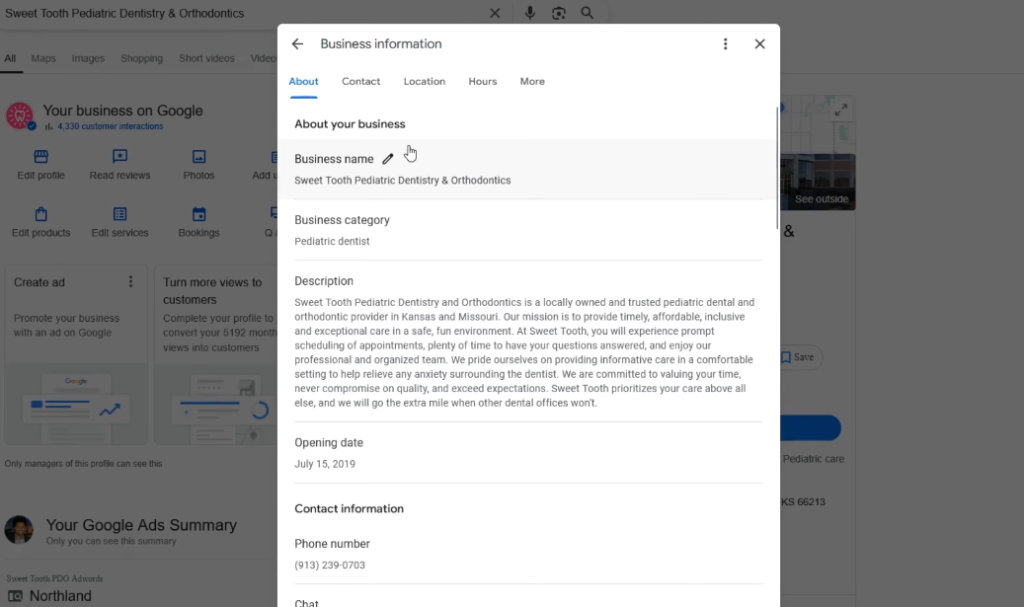
Choose the Right Primary and Secondary Business Categories
Choose the most accurate Google Business Profile categories to help Google understand your dental practice and match it with relevant local searches.
- Select a specific primary category: Choose the category that best represents your main service, such as Cosmetic Dentist, Pediatric Dentist, or Orthodontist, instead of a broad category like Dentist when a more specific option is available.
- Add relevant secondary categories: Include additional categories that represent other services you provide, such as Dental Clinic or Emergency Dentist, to increase visibility for related searches without changing your primary focus.
- Review categories regularly: Update your categories and services as your practice expands or Google introduces new options. Make sure your selected categories accurately reflect your current treatments and target patients.
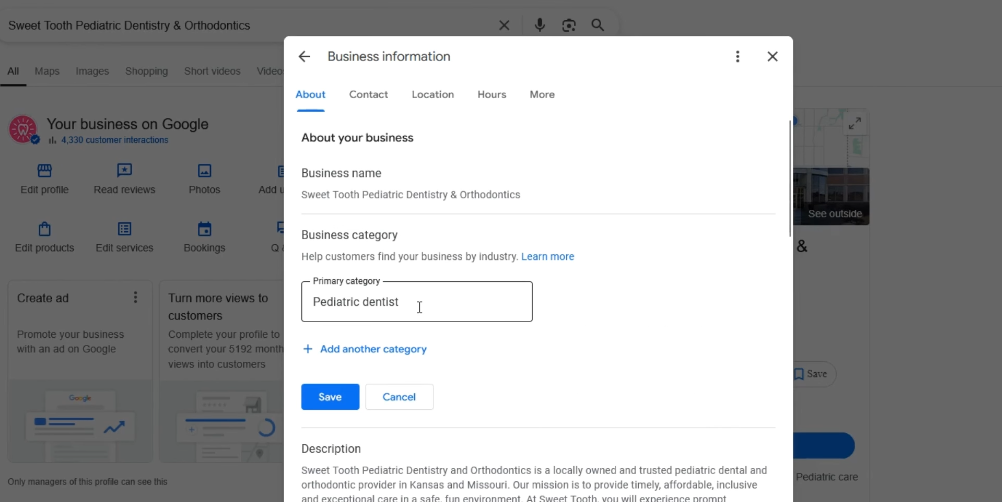
Write a Keyword-Rich Google Business Profile Description
A well-optimized Google Business Profile description helps Google understand your dental services and helps patients quickly identify if your practice matches their needs.
Focus on these elements:
- Use the available space effectively: Write a clear description that explains your specialty, main treatments, and what makes your practice different. Avoid keyword stuffing and prioritize useful information for patients.
- Include local and service keywords naturally: Mention your city and key treatments, such as dental implants, Invisalign, teeth whitening, or emergency dentistry, to improve relevance for local searches.
- Highlight your patient experience: Include details that build trust, such as experienced dentists, modern equipment, comfortable facilities, flexible scheduling, or patient-focused care.
A strong GBP description should clearly answer three questions: Who are you? Where are you located? What services do you provide? This helps both Google and potential patients understand your practice faster.
Add Complete Dental Services to Your GBP
Adding detailed dental services to your Google Business Profile helps Google understand your treatments and match your practice with more relevant patient searches.
Focus on these areas:
- Add all relevant services: Include every treatment your practice offers, such as dental implants, crowns, root canals, Invisalign, teeth whitening, and emergency dentistry. Use Google’s suggested services when they accurately represent your offerings.
- Optimize service names naturally: Add location details when relevant, such as Teeth Whitening in [City] or Dental Implants in [City], to strengthen local relevance without keyword stuffing.
- Write clear service descriptions: Explain what each treatment involves, who it is suitable for, and what patients can expect. Use descriptions to answer common questions and encourage potential patients to book.
Set Up Appointment Booking Links
Add a direct booking link to your Google Business Profile to make it easier for patients to schedule appointments directly from search results.
- Use a supported booking platform: Connect your GBP with compatible scheduling providers to enable a visible “Book Online” button on your profile.
- Link directly to your booking page: If you do not use an integrated provider, add a URL that takes patients directly to the appointment form instead of your homepage.
- Track booking performance: Use tracking parameters on your appointment link to measure how many appointments come from your Google Business Profile and evaluate local SEO performance.
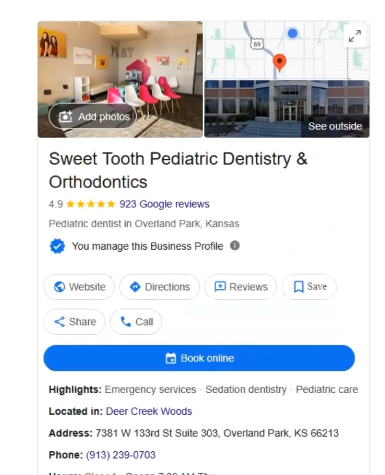
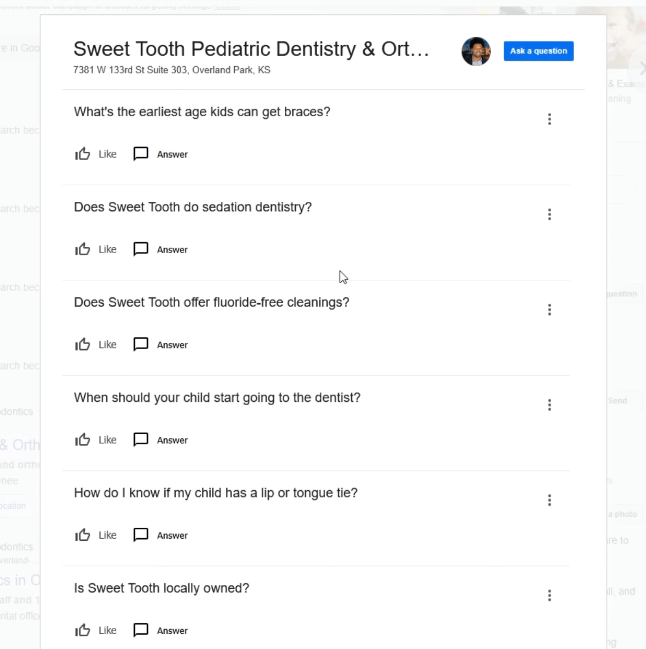
Complete the Questions & Answers Section
Use the Google Business Profile Q&A section to answer common patient questions and remove booking barriers before patients contact your practice.
- Add important questions proactively: Create and answer common questions about your services, insurance, appointments, parking, and office policies instead of waiting for users to ask.
- Focus on patient concerns: Address questions that influence booking decisions, such as Do you accept my insurance?, Do you offer emergency appointments?, or What treatments do you provide?
- Monitor new questions regularly: Respond quickly to user-submitted questions to keep your profile accurate and prevent outdated or incorrect information from affecting patient decisions.
Create Location-Specific Dental Service Pages
Create dedicated pages for each dental office location to target local searches and help patients find the right clinic in their area.
- Build a unique page for each location: Create separate landing pages for every branch instead of using one general location page. Include the specific address, phone number, hours, and services available at that office.
- Customize local content: Avoid duplicate pages. Add location-specific details such as nearby landmarks, local patient reviews, dentist profiles, and treatments offered at that clinic.
- Add local SEO signals: Include accurate business information, location details, and structured data to help search engines understand each practice location.
- Use location-focused CTAs: Add clear actions such as calling the office, viewing directions, or booking an appointment directly for that specific location.
Generate More Google Reviews From Patients
Consistently collecting genuine patient reviews helps improve local visibility, build trust, and influence new patients’ decisions.
- Automate review requests: Send SMS or email review requests shortly after appointments while the experience is still fresh.
- Make reviews easy to leave: Use a direct Google review link in follow-up messages, receipts, emails, or QR codes at your clinic.
- Train your staff to ask: Encourage front-desk teams and providers to request reviews naturally when patients share positive feedback.
- Guide without forcing keywords: Ask patients to describe their real experience, including the treatment they received or location when relevant.
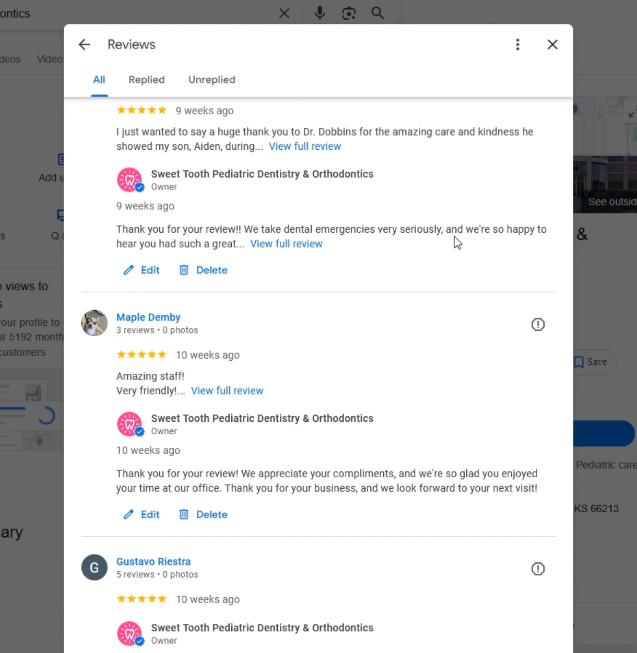
Respond to Every Review Professionally
Responding to reviews helps build patient trust and shows that your dental practice values feedback.
- Protect patient privacy: Avoid mentioning specific treatments, appointments, or confirming someone is a patient in public replies.
- Respond to positive reviews naturally: Thank patients and highlight your commitment to quality care without forcing keywords.
- Handle negative reviews professionally: Reply quickly, acknowledge the concern, stay respectful, and encourage the patient to contact your office privately for resolution.
Publish Regular Google Business Profile Posts
Regular Google Business Profile posts keep your listing active and provide more opportunities to engage potential patients.
- Post consistently: Share updates weekly to show ongoing activity and keep your profile fresh.
- Share useful content: Publish treatment promotions, new services, team updates, clinic news, or patient-focused information.
- Add clear CTAs: Include actions such as Book Appointment, Call Now, or Learn More to encourage patient engagement.
Build Local Citations and Directory Listings
Local citations help Google verify your dental practice’s location, services, and credibility across the web.
Focus on:
- Keep NAP information consistent: Ensure your business name, address, and phone number match exactly across your website, Google Business Profile, and directories.
- List your practice on trusted platforms: Add your clinic to major directories such as Yelp, Bing Places, and Apple Maps.
- Use dental-specific directories: Create profiles on relevant healthcare platforms like Healthgrades or Zocdoc to strengthen industry relevance and local authority.
Earn High-Quality Local Backlinks
Local backlinks help strengthen your dental practice’s authority by showing Google that your clinic is connected to the local community.
Focus on:
- Support local organizations: Sponsor community events, schools, or charities to earn mentions and links from local websites.
- Join business networks: Create listings through local Chamber of Commerce websites and business associations.
- Build local partnerships: Collaborate with nearby businesses and healthcare providers through guest posts, resources, or community initiatives.
Optimize Your Dental Website for Local Search
Optimize your dental website with clear location signals so Google can understand your practice area and match your pages with local searches.
Focus on:
- Keep NAP information consistent: Display your exact business name, address, and phone number across your website and match your Google Business Profile.
- Optimize local keywords: Include location-based keywords in page titles, headings, and descriptions for services you want to rank for.
- Add location signals: Embed a Google Map on your contact page and provide clear information about your clinic location.
Embed Google Maps on Your Website
Adding a Google Map to your website helps reinforce your clinic location and makes it easier for patients to find your practice.
- Use your official Google Business Profile map: Embed the map directly from your GBP instead of using third-party mapping tools.
- Place it on key pages: Add the map to your Contact page and location-specific pages near your address and phone number.
- Optimize for mobile users: Ensure the map displays correctly on mobile devices so patients can quickly view directions and visit your clinic.
Implement Local Business Schema Markup
Add local business schema markup to help search engines better understand your dental practice information and improve local search visibility.
- Use the right schema type: Implement dental-specific schema such as Dentist or MedicalBusiness instead of a general business type.
- Keep information consistent: Ensure your name, address, phone number, and business hours match your website and Google Business Profile.
- Connect online profiles: Use schema properties like sameAs to link your official profiles and trusted directory listings.
Learn more:
- 12 Dental Advertising Blueprints to Double Your Patients 2026
- Seo for Dental Practices: The Complete Guide to Ranking Your Practice on Google
- 25 Best Dental Website Design Examples to Inspire Your Practice in 2026
Frequently Asked Questions
How Long Does Local SEO Take for Dentists?
Generally 3 to 6 months. Low-competition areas may see map improvements within 30 to 90 days, while highly saturated metropolitan markets often require 6 to 12 months of consistent optimization to achieve top-3 rankings.
How Many Google Reviews Does a Dental Practice Need?
You need more reviews than your top 3 local competitors. While there is no fixed minimum, aiming for a baseline of 50 to 100 positive reviews with a consistent monthly acquisition velocity prevents competitor displacement.
What Are the Most Important Local SEO Ranking Factors?
The primary factors are proximity, relevance, and prominence. Practically, this translates to your physical distance from the searcher, complete Google Business Profile optimization, review volume/velocity, and consistent local citations.
Can Dentists Rank Without a Google Business Profile?
In the local Map Pack, no. In standard organic search results, yes. A verified Google Business Profile is strictly mandatory to appear in Google Maps and map-based search results.
How Much Does Dental Local SEO Cost?
On average, between $500 and $2,000+ per month. The actual cost scales directly with your market competition, the number of clinic locations you operate, and whether you require additional content creation and link-building services.