
You open Google Maps to check a new review and can’t tell where to click, or which account to use. How to see your Google reviews depends on which reviews you mean. For your business, sign in to the account that manages your Business Profile, search your business name, and select Read reviews. For reviews you wrote, open Google Maps, then Your contributions, then Reviews. Below are the steps for desktop and phone, fixes for missing reviews, and ways to track new ones.
How to See Your Business’s Google Reviews
For how to see my Google reviews as a business owner, you need the Google account that owns or manages your Business Profile.
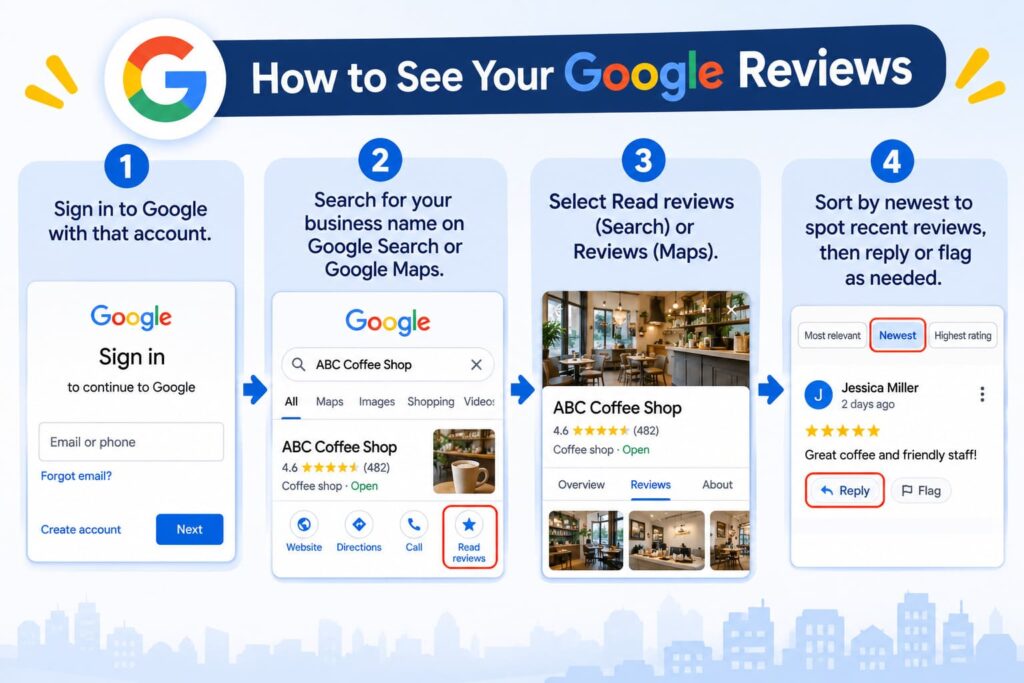
1. Sign in to Google with that account.
2. Search for your business name on Google Search or Google Maps.
3. Select Read reviews (Search) or Reviews (Maps).
4. Sort by newest to spot recent reviews, then reply or flag as needed.
There is no separate “Google reviews login.” You sign in with the same Google Account you used to claim or manage your Business Profile. Owners and managers can see and answer reviews there, and your business must be verified before you can reply.
Where can I find my Google reviews if I have several locations?
Each location has its own Business Profile and its own reviews. Search for each location by name and address, and open its reviews one at a time. If you manage many locations, Google offers a multi-location view, but its name and layout change, so check Google’s current help pages before you rely on a screenshot.
On a Computer, a Phone, or Google Maps
We checked these steps against Google’s help pages on November 16, 2026. Google changes menu names often, so a label may look slightly different.
On a computer
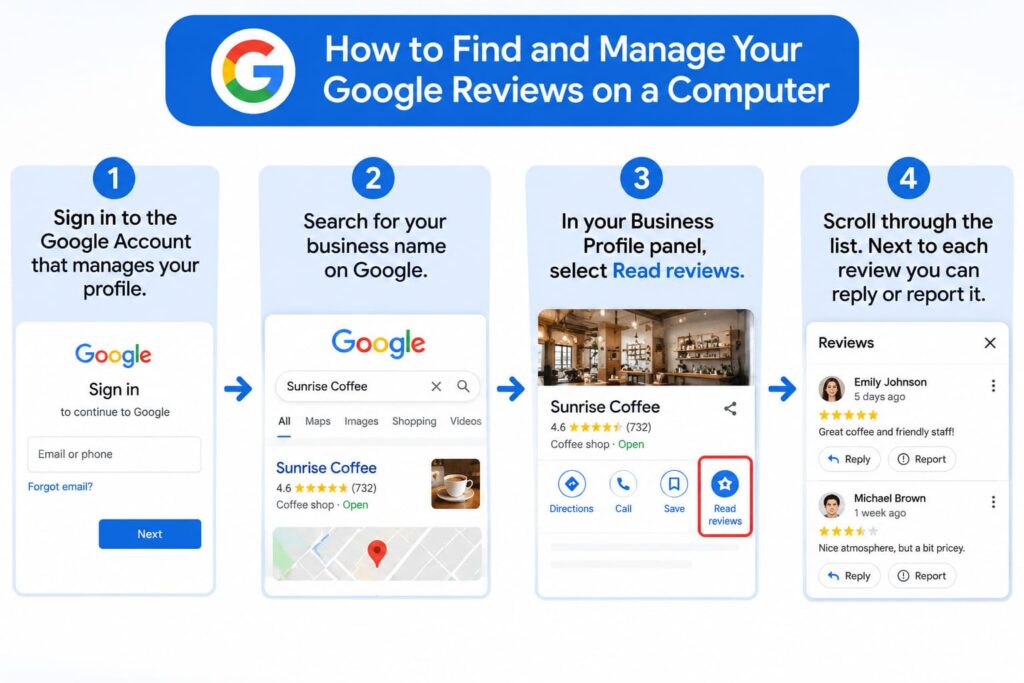
Here is how to find my Google reviews on a desktop browser:
- Sign in to the Google Account that manages your profile.
- Search for your business name on Google.
- In your Business Profile panel, select Read reviews.
- Scroll through the list. Next to each review you can reply or report it.
On a phone
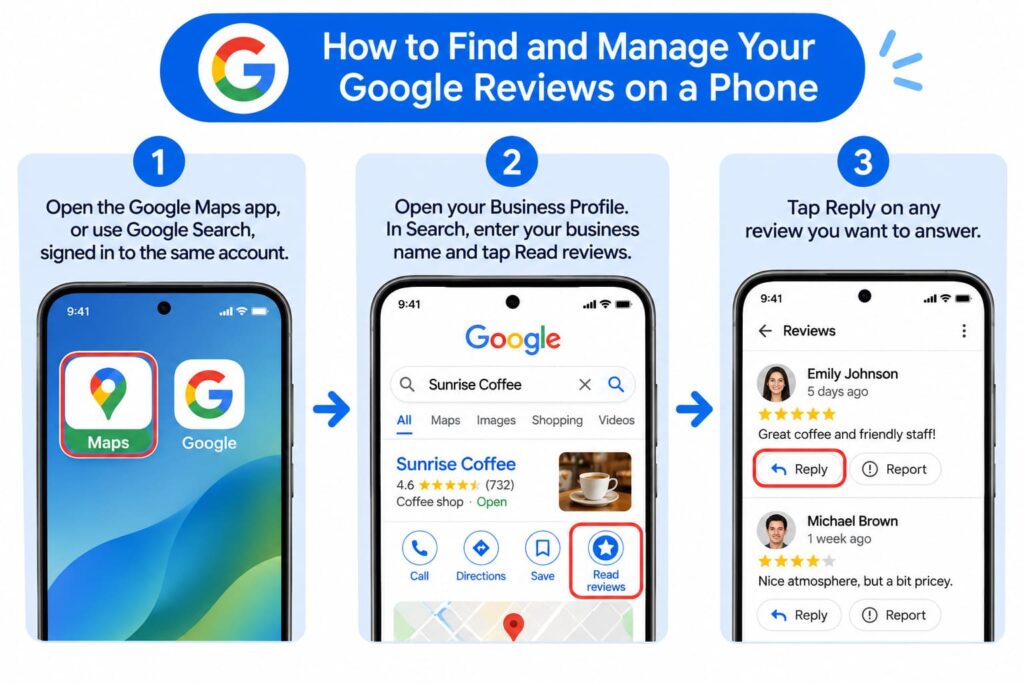
Want to see my reviews on Google from your phone? Use the Maps app or Search:
- Open the Google Maps app, or use Google Search, signed in to the same account.
- Open your Business Profile. In Search, enter your business name and tap Read reviews.
- Tap Reply on any review you want to answer.
Whether you use a phone or a computer, how to see my Google reviews comes down to one thing: which Google Account you’re signed in with.
The public view
That is how to see my Google reviews the way customers do: search your business name and city on Google Maps and select Reviews. Anyone can read public reviews without signing in. Owner tools such as replying and reporting need the signed-in view.
How to Find Google Reviews You Left
Searching google reviews by me? Here’s how to see my Google reviews as a customer: they live in your Google Maps contributions. Sign in to the account you used when you posted, then follow these steps.
- Computer: open Google Maps, click Menu, then Your contributions, then Reviews.
- Phone: open the Maps app, tap Contribute, then View your profile, then See all reviews.
- Shortcut: go to google.com/maps/contrib//reviews/ while signed in.
If you ask where do I find my Google reviews after switching phones, start with the account that was signed in to Maps at the time. If you can’t find a review you remember writing, you probably used another Google Account, and the question “how do I see my Google reviews across several accounts” has one answer: check each account separately. Check each account you own, including a work or old school account. Your reviews are public and appear with your profile name and photo, so anyone can find my reviews on Google by opening your profile. To change or remove one, see how to delete review google. To post a new one, read how do you leave a review on google.
Can’t See Your Google Reviews? Common Reasons
Still can’t find my Google reviews? Maybe a customer says they left one you can’t see. Check these causes first:
- Wrong account. Only owners and managers see the owner view. Confirm which account you’re signed in with.
- Still being checked. Google says reviews are checked against its policies, and this can take a few days.
- Filtered or removed. Google removes reviews that break its content policy, such as spam or conflicts of interest. Reviews that contain links are also a common spam trigger.
- Deleted by the reviewer. Customers can delete their own reviews at any time.
- A dashboard glitch. In July 2026, some owners saw “You have no reviews yet” in their reply panel while the public listing still showed the full count.
First, compare the dashboard with the public listing while signed out. If reviews are truly gone and you believe they followed the rules, document what’s missing and contact Business Profile support. Don’t ask staff or friends to post replacements, since that can break Google’s policies.
Track New Reviews Automatically
Turn on alerts so you don’t have to hunt for reviews. In Google’s Business Profile help, the setting is under Customer activity:
- Go to your Business Profile on Google Search.
- Select More, then Notifications.
- Turn on the alert for customer activity, which covers new reviews and photos.
Alerts may arrive by email, in Search, or in Maps. Then review a few numbers each month:
| Metric | Where to find it | What to watch |
|---|---|---|
| Star rating and total reviews | Your Business Profile | Slow drops or flat counts |
| Review velocity (new reviews per month) | Sort reviews by newest and count | Steady flow beats a sudden burst |
| Reviews with text or photos | Review list | Details customers mention |
| Reply rate and speed | Read reviews | Unanswered reviews |
Knowing how to see my Google reviews is only step one. A short weekly routine keeps the habit going:
- Open your reviews and sort by newest.
- Reply to every new review, good or bad.
- Report any review that breaks Google’s policy, such as spam or a competitor posing as a customer.
- Note repeated themes, like slow service or a staff member customers praise.
- Share your review link with the customers you served this week.
Reviews also matter beyond reputation. Google says more reviews and positive ratings can improve local ranking, including your chances of appearing in the Local Pack (Google Business Profile Help). Keep in mind that a sudden burst of reviews can look unnatural to spam systems, so a steady pace is safer.
From Seeing Reviews to Acting on Them
Reply. Your answer appears under the review as a response from the owner. Google notifies the reviewer, who can read it and edit their review. Reply to good and bad reviews alike.
Ask for more reviews. In your Business Profile, select Read reviews, then Get more reviews, to copy your review link or QR code. Share it with every customer, in person, on receipts, or in a follow-up message.
Play by the rules: Google’s policy bars offering gifts or discounts for reviews, and it bars asking only happy customers (review gating). The FTC’s 2024 rule on consumer reviews also bans fake reviews and compensation tied to a positive opinion (Federal Register, Aug. 22, 2024). Ask everyone, offer nothing in return, and never buy reviews.
Now that you know how to see my Google reviews and what to do with them, build on it. For the full strategy, from getting reviews to using them in marketing, read our pillar guide to google reviews for business.
Frequently Asked Questions
Can I see Google reviews without signing in?
Yes. Public reviews on Google Maps and Search are visible to anyone. You only need to sign in to reply, report, or manage your own contributions.
Who else can read and reply to my business’s reviews?
Owners and managers added to your verified Business Profile can read and reply. Add team members only through the profile’s access settings, never by sharing your login.
Can I see a review that was deleted?
No. Once a reviewer or Google removes a review, it no longer appears. If you think Google removed a compliant review by mistake, contact Business Profile support.
Is my review link the same as my profile link?
No. The review link opens the box where customers rate and write a review, while your profile link opens your listing.