



Google local service ads, officially called Local Services Ads, sit above regular search results, and you pay per lead instead of per click. But you can’t simply buy your way in. Google has to verify your business first, and that step is where most owners get stuck.
To set up Local Services Ads, confirm your category is eligible, create your account with your services and service area, pass Google’s verification checks, set a weekly budget and bidding mode, and answer every lead fast. Below are the steps, what to prepare, costs with dated sources, and fixes for common problems.
Set Up Google Local Service Ads in 9 Steps
- Check that your category and area are eligible.
- Gather your licenses, insurance, and ID.
- Verify your Google Business Profile.
- Sign up and enter your business details.
- Complete verification checks.
- Set billing, a weekly budget, and a bidding mode.
- Finish your profile with photos and highlights.
- Go live.
- Answer, dispute, and review leads every week.
What to Prepare Before You Start
Requirements vary by category and region, but Google says screening may include license, insurance, and background checks. Have these ready:
- Access to your Google Business Profile, or the ability to create one.
- Business registration details and, for owners and service professionals, ID for background checks.
- License numbers where your category requires them.
- A certificate of insurance. The name on it should match the name you use to sign up.
- Photos of your team and work.
- A phone line and messages you can answer during the hours you plan to advertise.
What Do Google Local Service Ads Cost?
Google’s help pages say you’re charged for each valid lead, and lead prices vary by location, job type, lead type, and bidding mode. Google doesn’t publish one price. These dated figures from third parties show the range, and your own cost will differ.
| Figure | Amount | Source and date |
|---|---|---|
| Message lead price vs. phone lead | 50% of a phone lead | Google Ads Help, Local Services Ads pricing (checked Oct 7, 2026) |
| Average cost per unique lead, home services (1,011 businesses) | $63.29, with a 40.9% book rate | Webtonic, July 18, 2026 (data for May 2026) |
| Year-over-year change in LSA lead costs | Up 11% to 69%, depending on trade | 99 Calls, published Sept 4, 2026, as cited by Lead Smart (Sept 6, 2026) |
| For comparison: Google Search ads, dentists (CPC / cost per lead) | $8.00 / $72.97 | WordStream 2026 benchmarks, as reported by Webtonic |
Google also offers a budget calculator on the Local Services Ads homepage. Use it for an estimate, then adjust from your own results.
Set Up Local Services Ads
Step 1: Check eligibility
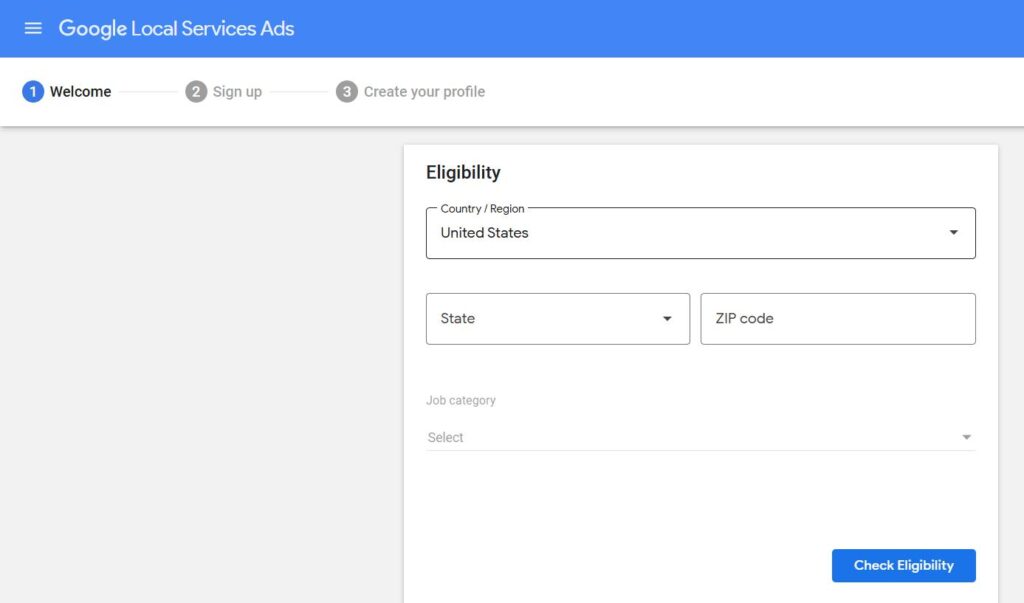
Google says Local Services Ads are available only for certain categories. Use the eligibility check on Google’s sign-up page to see whether your business and area qualify. If your service doesn’t appear, Google probably doesn’t support it in your market yet, though a close category label sometimes works.
Step 2: Gather your documents
Collect the items from the checklist above in one folder. Mismatched names are a common reason for delays, so make sure your insurance, license, and sign-up name agree.
Step 3: Verify your Google Business Profile
Google matches your ad to your Business Profile so only authorized people manage your calls and details. If a profile exists, confirm you own or manage it. If none is found, create one. Google says creation and verification can take up to five business days.
Step 4: Sign up and enter your business details
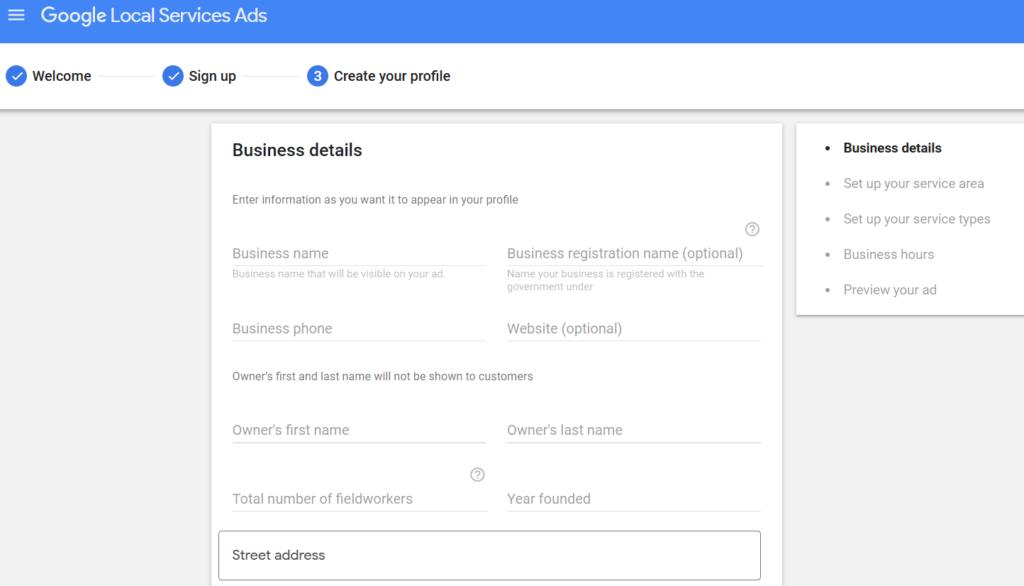
Enter your business name, address, hours, service area, and the job types you want leads for. Keep your service area realistic, because an area that’s too wide can bring poor-fit leads.
Step 5: Complete verification
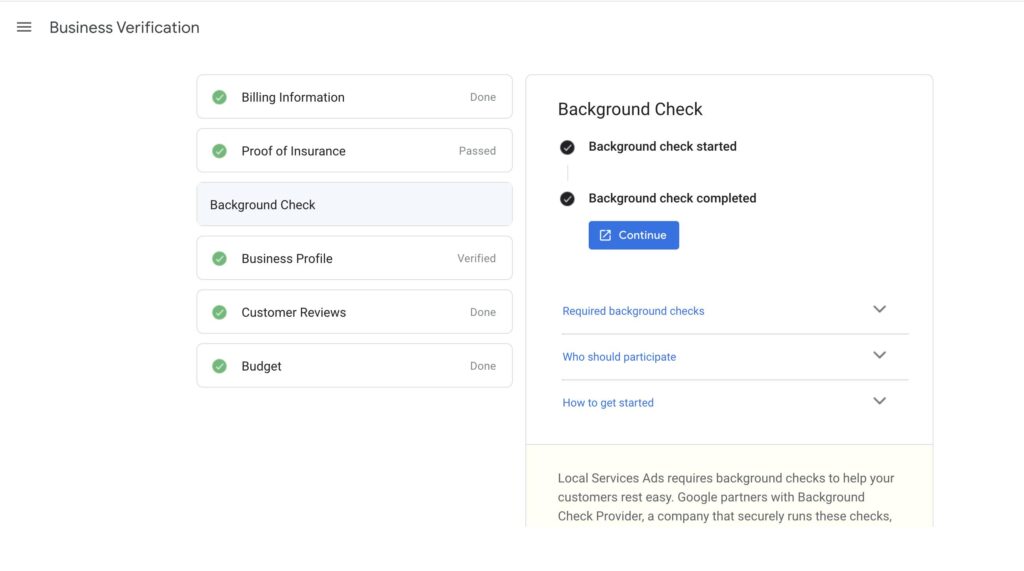
Google lists business entity, owner, and service professional background checks, plus license and insurance checks where applicable. Google says businesses aren’t charged for the background check and it involves no credit pull. If a check shows an error, the business or worker can contact the background check partner to correct it.
Step 6: Set billing, a weekly budget, and a bidding mode
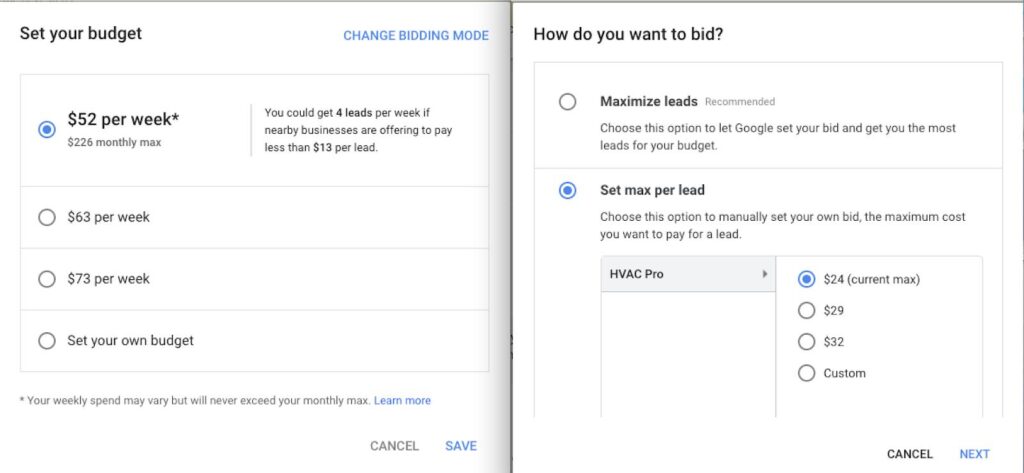
Your average weekly budget sets how many leads you’d like per week. Google says you can spend more than that in a given week but never more than your monthly max, which is the weekly budget times the average number of weeks in a month. Then choose a bidding mode for the most you’re willing to pay per lead.
Step 7: Finish your profile
Add photos, up to six standard highlights, and link your Business Profile so its reviews appear on your ad. In your lead inbox, open Profile & Budget to edit hours, service area, job types, and photos at any time.
Step 8: Go live
Google’s help pages describe “pre-badge ads,” which let you receive leads after passing preliminary checks while you finish the remaining onboarding checks. Once all checks pass, your profile shows the Google Verified badge. Older articles call it Google Guaranteed or Google Screened.
Step 9: Manage leads every week
Answer calls and messages quickly, since responsiveness is a ranking factor Google mentions. Dispute invalid leads, review your cost per booked job, and adjust your budget only after you’ve seen a few weeks of data.
Local Services Ads vs. Search vs. Performance Max
These are separate products. You can run them together.
| Local Services Ads | Search campaigns | Performance Max | |
|---|---|---|---|
| You pay | Per valid lead | Per click (CPC) | Per click or conversion goal, depending on setup |
| You control | Job types, service area, weekly budget, bidding mode | Keywords, negative keywords, ad copy, call extensions, bidding strategies | Goals, assets, and audience signals; Google automates the rest |
| Quality signals | Profile, reviews, responsiveness | Quality Score and ad relevance | Asset quality and conversion data |
| Tracking | Lead inbox for calls and messages | Needs conversion tracking set up | Needs conversion tracking set up |
Once Search is running next to your Local Services Ads, our guide to Google Ads optimization shows how to improve it.
Common Errors and How to Fix Them
| Problem | Likely cause | Fix |
|---|---|---|
| Your service isn’t listed | Category or area isn’t supported yet. | Re-run the eligibility check, try a close category label, and consider Search ads meanwhile. |
| Verification is stuck | Name mismatch, unverified Business Profile, or missing documents. | Match names exactly, confirm your profile, and check the dashboard for the failing step. |
| Background check error | Incorrect data in a check. | Contact the background check partner to correct it. |
| Few leads | Weekly budget too low, slow responses, thin reviews, or a poor service area. | Review budget pacing, respond faster, build reviews, and tune the service area. |
| Invalid leads | Spam, wrong service, or out-of-area calls. | Dispute within 30 days in the US. Google says disputes aren’t available for health care verticals. |
| Missed calls | Ads running when nobody can answer. | Set ad scheduling to your staffed hours and text back missed callers. |
Tips for US Local Businesses
- Fix your Google profile first. Your Business Profile reviews appear on your ad when you link them, so keep them current and earn them without incentives.
- Track booked jobs, not just leads. Compare cost per booked job by service and area before you change budget.
- Set a budget from capacity. Lead volume only helps if you can answer and serve it.
- Expect rules to differ by category. Google’s own help text has listed different categories as ineligible for the Verified badge over time.
- Health practices: disputes aren’t available, and privacy rules apply to anything you say or track. Read our guides to google ads for dentists and google ads for doctors.
FAQ: Google Local Service Ads
How much do Google local service ads cost?
You pay per valid lead, and price varies by category and market. One 2026 analysis of home services found an average of $63.29 per unique lead (Webtonic, July 18, 2026). Use Google’s budget calculator for your own estimate.
What is the difference between Google Guaranteed and Google Verified?
Google’s current help pages call the trust badge “Google Verified.” Older articles use “Google Guaranteed” and “Google Screened,” so names may differ depending on the source and date.
How long does verification take?
It varies by category. Google says matching and verifying a Business Profile can take up to five business days, and other checks depend on your documents.
Do I pay for every call?
You pay for valid leads. In the US you can dispute invalid ones within 30 days, except in health care verticals.
Can I run Local Services Ads and Search ads together?
Yes. They’re separate products with different controls, and many businesses run both.
Can dentists and doctors use Local Services Ads?
Availability depends on your category and area, so use Google’s eligibility check. Health care advertisers should also review privacy and ad policy rules.
Start With Verification, Then Watch the Data
Check eligibility today, gather your documents, and set a modest weekly budget you can answer. For the full picture of paid search for your business, read our guide to Google Ads for local business.
Sources (checked Oct 7, 2026): Google, Getting started with Local Services Ads · Google, How providers qualify · Google, Screening and verification · Google, Business Profile affiliation · Google Ads Help, Local Services Ads pricing and disputes · Google Ads Help, editing your ad · Webtonic, Local PPC (July 18, 2026) · Webtonic, Google Ads statistics (2026) · Lead Smart press release (Sept 6, 2026), citing 99 Calls. Cost figures come from third parties and may differ from Google’s data or your results.